Screenshots
Description
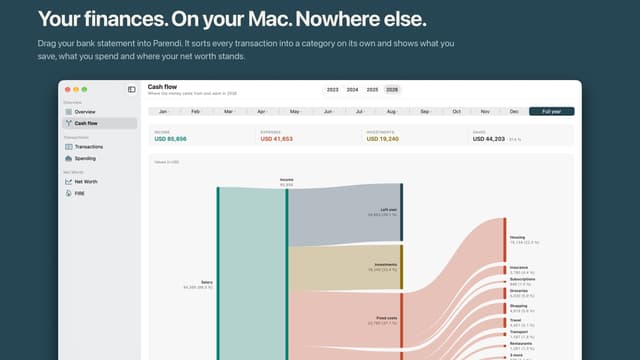
Drag your bank statement into Parendi. It sorts every transaction into a category on its own and shows what you save, what you spend and where your net worth stands. Import Download the statement from your online banking. camt.053, OFX, CSV or Excel: whatever your bank offers will do. Drag the file into the window. Mapping columns is a first-time job at most. Importing the same month again is safe: Parendi compares per account and only takes what is genuinely new. Categories Every transaction lands in a category. What you have already shown the app counts first, then your keywords, then Apple Intelligence on your own Mac. Each row says where its suggestion came from. Correct an assignment and the app remembers that exact transaction text and sorts it the same way on the next import. There are no rules rewriting themselves behind your back. Overview Savings rate, income, spending and investments, each against last year. Below that the monthly trend as a chart and as a table, because the table gives you the numbers the chart only hints at. Cash flow Cash flow draws a year or a single month as a diagram. Income comes in on the left and moves on to the right: what was left over, what you invested and what you spent, down to the single category. The width of each band is the amount. Spending The spending view works out a monthly figure per category from the last twelve months. Two views, the same calculation: all categories, or only the ones you marked as fixed costs. What counts as a fixed cost is your call. The app doesn't guess at it: whether your gym membership is fixed is something only you know. Net worth You create what you own: current account, brokerage account, pension, the house, the mortgage. Each position gets a monthly value, and the mortgage is allowed to be negative. The calculator that already knows FIRE calculators on the web start by asking for your annual spending, your savings rate and your net worth. Parendi has all three already, from your transactions instead of your estimate. What comes out is the point where your assets carry your spending. Everything in today's purchasing power, so the number means what it appears to mean. It stays a projection from assumptions you set yourself, and it is not financial advice. Spent once, counted twice The lines on the card statement are the expenses. The payment of the bill on your bank account goes into a transfer category that stays out of every report, in both directions. Your data Everything lives in a SQLite database on your Mac. There is no account for it, nothing syncs and nothing is transmitted anywhere. Once a day the app writes a backup to the folder you choose. iCloud Drive, an external disk, whatever you prefer. ⌘B any time you want one now. A Mac app Menus, keyboard shortcuts, undo across every step, light and dark, seven languages. None of it is a rebuild. Buy it once. Done Trial: 30 days from the first import, extendable once by another 30. After that the app stays readable instead of locking itself. Requirements: A Mac with Apple silicon and macOS 26 or later. Suggestions from Apple Intelligence need a Mac with it turned on; the import and every calculation work without it.
Release Notes
App Details
| Size | 3.1 MB |
|---|---|
| Initial release | |
| Price | |
| Platforms | Mac |
| Languages | English, French, German, Italian, Japanese, Portuguese, and Spanish |
| Category | Finance |
| Website | parendi.app |
| Compatibility | |
|---|---|
| Mac | Requires macOS 26.0 or later and a Mac with Apple M1 chip or later. |
More By This Developer
App's data is regularly updated.
Last update: