
Screenshots






Description
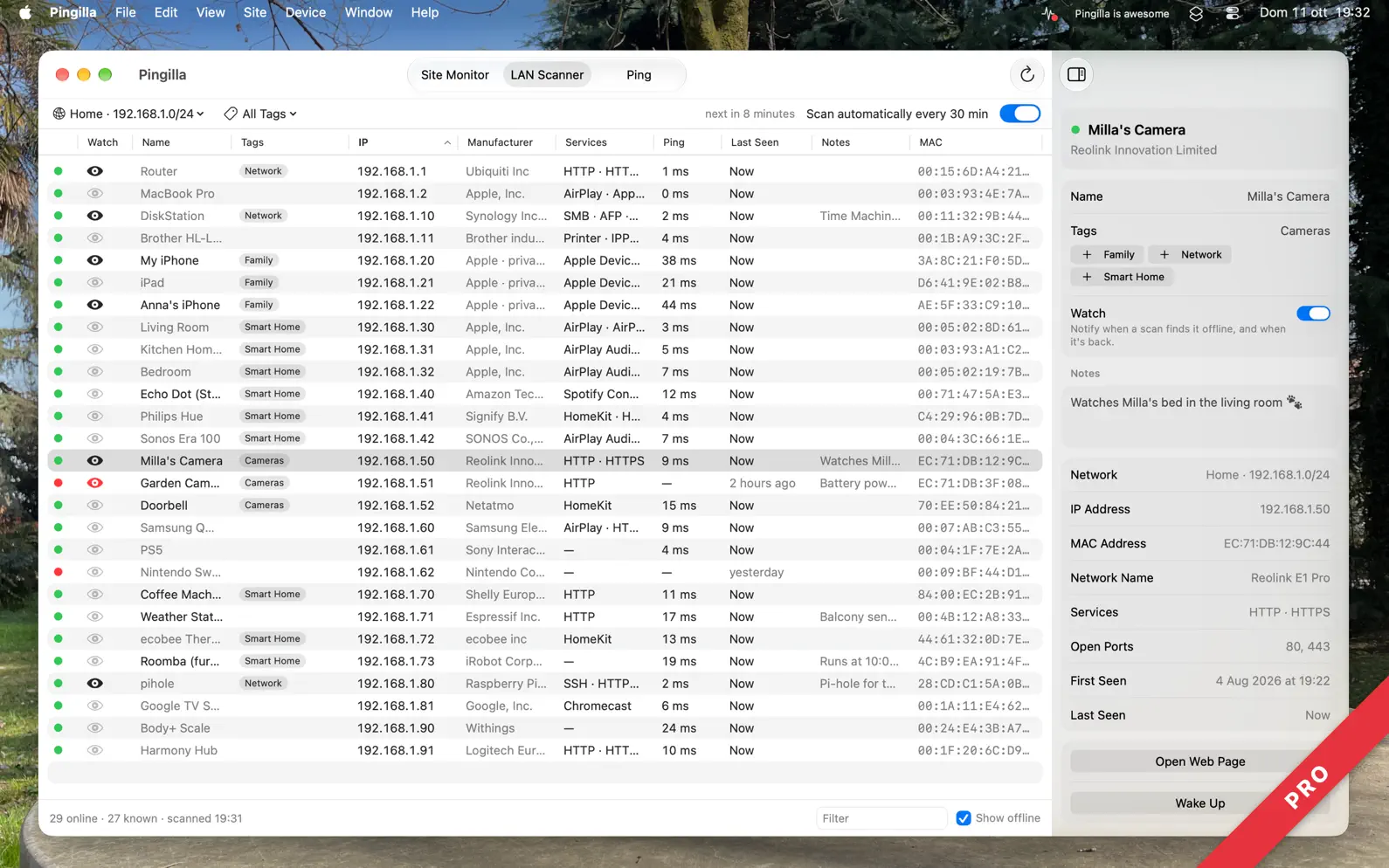
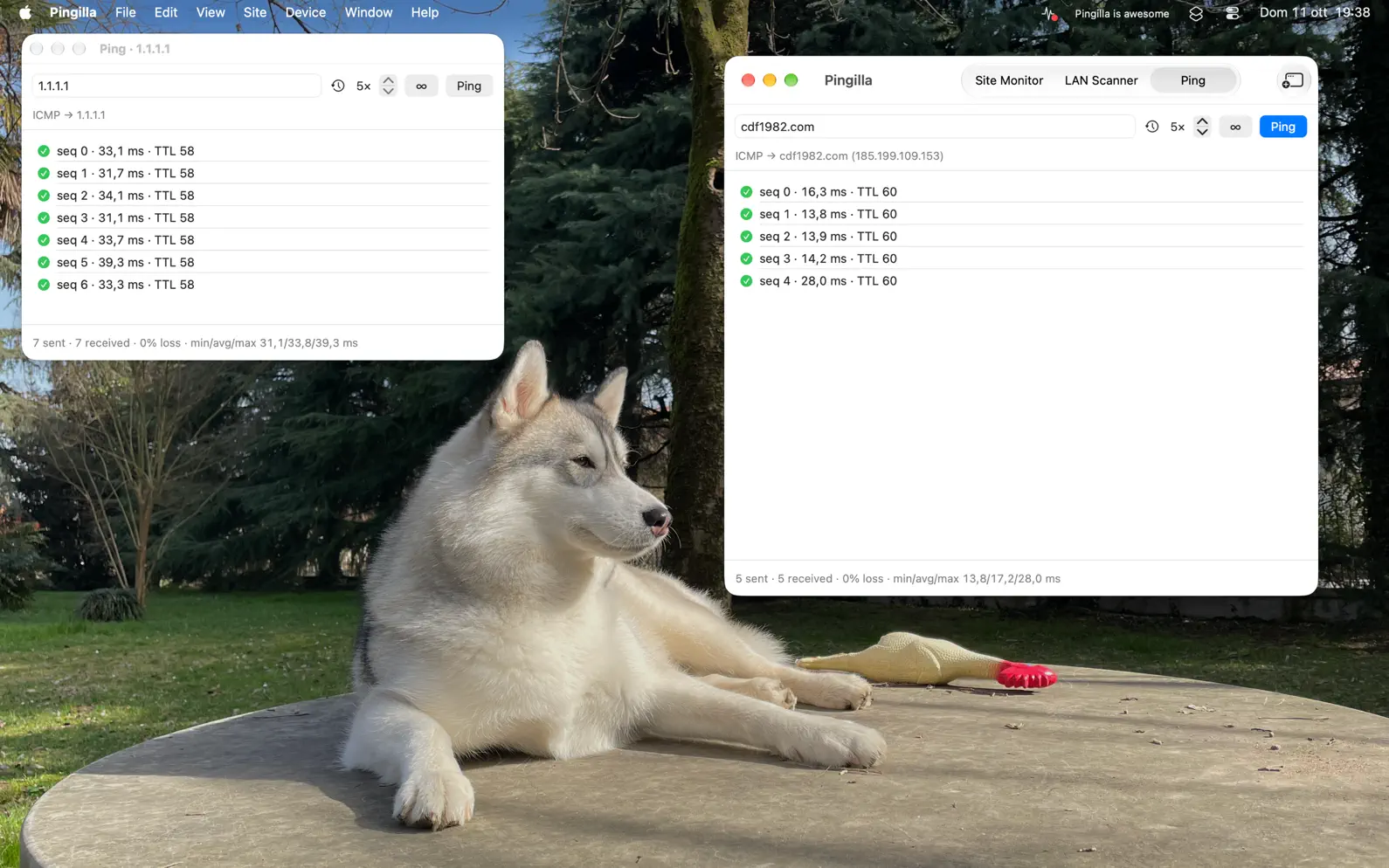
Pingilla watches your websites and your local network from the Mac menu bar, and gets you to your devices in one click. • Site Monitor: a red dot and a notification when a site is down, and another when it's back. • LAN Scanner: every device on your network, with IP, MAC address, manufacturer, name, hostname and, with Pro, its services. • Pinned Devices: your Macs, NAS and servers in the menu bar, with their status. One click opens Screen Sharing, SSH, file sharing or their web page (Pro). • Ping: any address, local or on the internet, one click away. Free to download and useful from day one: 3 sites checked every 5 minutes, 24 hours of history, the first 20 devices of each scan, up to 20 pings at a time. Pingilla Pro is a one-time purchase with Family Sharing that removes every limit: no subscription, no account, no analytics. Your data never leaves your Mac. SITE MONITOR • Checks your sites in the background and shows their status in the menu bar. • No false alarms from flaky Wi-Fi: before reporting a site as down, Pingilla makes sure your Mac is online, and it pauses while your Mac sleeps. • Uptime and a response time chart for the last 24 hours, plus 7 and 30 days and a list of every incident with Pro. • A warning before a site's SSL certificate expires (Pro). LAN SCANNER • Scans your network in about 10 seconds and finds even devices that ignore ping, like iPhones. • Shows each device's hostname and Bonjour name, even when your router doesn't know them, ready to copy. • Remembers the devices of each network (home, office…), with Last Seen, your own names, notes and tags (Pro). • Automatic scans, and a notification when a new device joins or a watched one goes offline (Pro). • Open ports and services: SSH, web, file sharing, Screen Sharing, printers, AirPlay, HomeKit and more (Pro). • Opens the control panel of Synology NAS, UniFi, Proxmox, Home Assistant, Portainer and Plex (Pro). • Wake on LAN: wake up a sleeping Mac, NAS or PC (Pro). PINNED DEVICES (PRO) • Pin the devices you use most: they wait in the menu bar, with a status dot from a fresh ping each time you open the menu. • One click opens what you need: Screen Sharing (High Performance too), the web page, file sharing or SSH in Terminal. Pingilla picks the best one, or you choose it per device. • A sleeping device? The click wakes it up with Wake on LAN. • Devices of your other networks stay pinned, and turn green when you can reach them, say through a VPN to the office. PING • Real ping to any IP address or host name, or an HTTP check for a web address, with packet loss and response times. Open more Ping windows to watch several addresses at once. With Pro, ping until you stop, with your own interval and timeout. YOUR MENU, YOUR WAY • Reorder the menu's sections and hide the ones you don't use. • Open the menu from any app with a keyboard shortcut of your choice. • Menu bar, Dock or both, and it can start at login. YOUR DATA • Back up everything to a single file and restore it on any Mac. • Export your devices or a site report as CSV or text, or print them and save as PDF. PINGILLA PRO One purchase, everything unlocked: unlimited sites checked as often as every 30 seconds, 7 and 30 day history with incidents, certificate expiry alerts, every device with memory, names, notes and tags, automatic scans and alerts, all your networks, ports and services, pinned devices in the menu bar, Wake on LAN, and unlimited ping. Family Sharing included. MADE FOR MACOS 27, STILL LOVES SEQUOIA Made for macOS 27 Golden Gate, also runs on macOS 26 Tahoe and macOS 15 Sequoia. Pingilla is named after Milla, my Siberian Husky, who is also its icon. I'm Cesare, an indie developer, and I built Pingilla because I needed a menu bar uptime monitor I could rely on. Questions and ideas are welcome at support@cdf1982.com. Privacy Policy: https://cdf1982.com/privacy/pingilla_privacy_policy.html Terms of Service: https://cdf1982.com/privacy/pingilla_terms_of_service.html
Release Notes
Your favorite devices, one click away. • Pinned devices in the menu bar (Pro). Right-click a device in LAN Scanner and choose Pin to Menu Bar: it shows up in Pingilla's menu with a status dot, and a click opens Screen Sharing, its web page, file sharing or SSH. Pick what the click does in the device details. Devices of your other networks stay there too, and turn green when you can reach them, say through a VPN. • Your menu, your order. In Settings › General you can drag the menu's sections into the order you like, and hide the ones you don't use. • A keyboard shortcut to open and close Pingilla's menu from any app, also in Settings › General. • More web pages. Open Web Page now also finds Synology NAS, UniFi controllers, Proxmox, Home Assistant, Portainer and Plex, which use their own ports. • Fixed: the gray details under sites and pinned devices in the menu no longer vanish while it's open. Reordering the menu, the keyboard shortcut and the new web pages are free for everyone. If you have ideas or run into anything, I'd love to hear about it at support@cdf1982.com. And if you have a moment for a review in the App Store, or to tell your friends about Pingilla, it always helps indie developers like myself. My best, Cesare
• v1.3All release notes
App Details
| Size | 3.9 MB |
|---|---|
| Initial release | |
| Price | |
| Platforms | Mac |
| Languages | English |
| Category | Utilities |
| Website | cdf1982.com/pingilla-uptime-monitor-lan-scanner.html |
| Compatibility | |
|---|---|
| Mac | Requires macOS 15.0 or later. |
More By This Developer

ClipBar: Pasteboard Viewer
Current clipboard and history

SendScan: Scanner + Automation
Workflows to scan, OCR & share
GlanceCam - IP camera viewer
Stream one, or 50, webcams

LifePace Habit Streaks Tracker
Build Routines That Last

MarkCam: timestamp & watermark
Photo overlay: date, text, GPS

Link HUB Lock Screen Widgets
URL Launcher & Lockscreen apps
Similar Apps
Ping • Uptime Monitor
Website & Network Diagnostics

Radien: Network Toolbox
IP Scanner, Ping, Wake on LAN

iStat Menus 7
The ultimate system monitor

Pelican: AI Chat Assistant
Ask anything. Get it done.
WebMeter: Uptime Monitor
Website, Server & API Widget

Notify - Web & Script Notifier
Website and Script Monitoring
App's data is regularly updated.
Last update: