Screenshots

Description
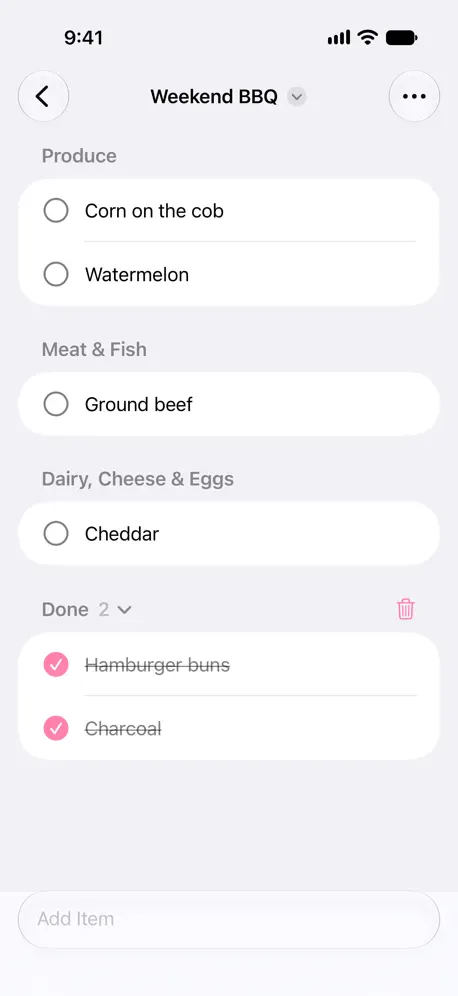
A shopping list that is fast to add to and fast to check off. Type an item and press return. It goes into the right store section automatically, like Produce, Dairy, or Household, so your list follows the way you walk through the store. Tap an item to check it off. The app is intentionally simple. No accounts, settings, ads, recipes, meal plans, or prices. Nothing to set up. It does one thing well: your shopping list. It supports English and Norwegian. ■ Highlights ‣ Sorted by store section automatically, with Apple Intelligence ‣ Share a list with your family and see their changes right away ‣ Check off items from a widget, without opening the app ■ More features ‣ Suggestions as you type, from your earlier items and common groceries ‣ Type “2 milk” to set the quantity ‣ Multiple lists, for example, one for each store ‣ The screen stays on while you shop ‣ Send a list as text to someone without an iPhone ‣ Syncs across your devices with iCloud ‣ Paste a copied list to add one item per line ‣ Lock Screen widgets, a Control Center control, and the Action button ‣ Siri and Shortcuts: “Add to Bare” ‣ Apple Watch app that works on its own Store sections need Apple Intelligence. Without it, common groceries are still sorted, and other items go in Other.
Release Notes
No release notes found
App Details
| Size | 23.4 MB |
|---|---|
| Initial release | |
| Price | $3.00 |
| Platforms | Mac, Apple Watch, iPhone, and iPad |
| Languages | English and Norwegian Bokmål |
| Category | Productivity |
| Compatibility | |
|---|---|
| iPhone | Requires iOS 27.0 or later. |
| iPad | Requires iPadOS 27.0 or later. |
| Mac | Requires macOS 27.0 or later and a Mac with Apple M1 chip or later. |
| Apple Vision | Requires visionOS 27.0 or later. |
| Apple Watch | Requires watchOS 27.0 or later. |
More By This Developer
QuickGPT
Easy access to ChatGPT

System Color Picker
The built-in color picker

Plash
A website as desktop wallpaper

Dato
Menubar Calendar, World Clocks

One Thing
Put one task in your menu bar

Recordia
Simple audio recorder

Aiko
AI Speech-to-Text (Transcribe)

Folder Peek
Put folders in the menu bar

Super Menu
Files, apps, links in one menu

SOML Editor
View and edit SOML files
Scratchpad
Quickly draft notes and ideas

Favorites Widget
Contacts on Lock & Home Screen

AI Actions for Shortcuts
AI-powered Shortcuts

Shareful
Supercharge system share menu

Battery Indicator
Remaining battery time/percent

Short Run
Run shortcuts from the menubar
Today •
Calendar events in menu bar

Lungo
Keeps your computer awake

Text Lens
Capture text from screen — OCR

Camera Preview
Your Instant Mirror

Pure Paste
Paste as plain text by default

Menu Bar Calendar
Month calendar, one click away

Zone Bar
World clocks in your menu bar

Pandan
Time awareness in your menubar
Gifski
Convert videos to quality GIFs

Velja
Browser picker

Menu Drop
Share files from menu bar

Photo Widget — The Best One
Photo home screen widgets

Mailway
Route mailto links to apps/web

Command X
Cut and paste files & folders

Actions
Useful actions for Shortcuts

Speediness
Check your internet speed
Any Text · Widgets
Put text on Lock/Home Screen
Day Progress
Time's Tally, No Dilly-Dally

Online Check
Online status in your menu bar
Black Out
Redact parts of an image

Imago – Create Images
AI Image Generator using Flux

Plain Text Editor
Simple notepad

HEIC Converter
Convert HEIC to JPEG or PNG
Simple Color Palette
Create and view color palettes

Blear
Make awesome blurry wallpapers

Hyperduck
Send links from iOS to a Mac

Pasteboard Viewer
Inspect the system pasteboards

Googly Eyes
Eyes that follow your cursor

Second Clock
Another clock in the menu bar

Spaced
Group your menu bar items

One Task
Conquer one task at a time

Quick Launch
Open apps & links from widgets
DS_Store Inspector
Inspect .DS_Store files

Randa
Generate random numbers

UTC Time
Show time in menu bar & widget

Amazing AI
Text-to-Image Stable Diffusion

Week Number
The Current Week Number

Ask AI
AI magic powers on your wrist

Doodle Draw
Sketch, Imagine, Unleash!
Floating Clock
The missing clock

Icon Preview
Preview App & Menu Bar Icons

Memo Widget
Sticky Notes on Home Screen
Shortcutie
Additional actions for the Shortcuts app on Mac
Default Browser
Switch default browser from your menu bar
Supercharge
Elevate your Mac experience
Menu Bar Spacing
Customize the gap between menu bar items
Similar Apps

Shared Grocery List Organizer
Family Shopping & To Do List

Grocery - Smart Shopping List
Plan, shop, cook, repeat
ListMate - Lists & Recipes
Grocery Shopping & Meal Voting

Milk - Sorted Grocery List
The Shopping List That Learns

Handla: Grocery Shopping List
Save Recipes, Plan Meals
Daily Checklist: CheckYourList
Repeat Routine Task List Maker
App's data is regularly updated.
Last update: