Screenshots
Description
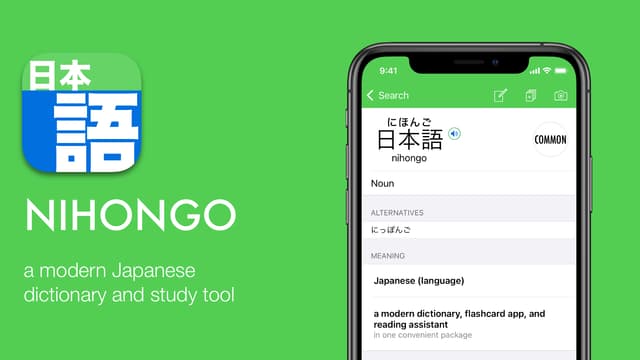
Nihongo is an offline Japanese dictionary, picture-to-text translator, flashcard app, and reading assistant. Our app helps you learn Japanese naturally, using the words you encounter in daily life—on menus, signs, manga, emails, books, and more. In addition to the dictionary, you can take a picture of Japanese text or paste it from any source. Nihongo will then translate the text, add furigana or romaji, and create flashcards so you can study and steadily build your vocabulary. Here are the complete features of the app: DICTIONARY * Over 200,000 words, 205,000 example sentences, and 6000 kanji entries. * Every word clearly marked as common, uncommon, or rare. * Add your own notes to any dictionary entry. * Quickly identify transitive/intransitive word pairs. * Audio pronunciations of words and example sentences (Requires Nihongo Pro) PHOTO LOOKUP (OCR) [Pro] * Look up words just by taking a picture. * Uses Google Cloud Vision to provide high-quality text recognition. * Just tap on a word to look it up. CLIPPINGS (READING ASSISTANT) [Pro] * Adds furigana or romaji to text pasted into the app. * Tap on any word to see its definition without leaving the clipping. * Flashcard deck automatically created so you can study the new words in a clipping. * Display text horizontally or vertically. * Have Nihongo read any clipping out loud. FLASHCARDS [Pro] * Flashcards automatically generated from words you lookup in the dictionary or paste into the app. * Nihongo learns what words you know, and won't bother you again with words you've mastered. * Built-in kanji flashcard decks up through Middle School. * Intuitive spaced repetition flashcard system for vocabulary and kanji drawing. * Level up flashcards by studying every day. * No penalty for missing a day of study, come back anytime. SEARCH * Search using English, Japanese, or romaji. * Supports searching for conjugated words in both English and Japanese. * Search for kanji using radicals and stroke counts. SAFARI EXTENSION [Pro] * Add furigana or romaji to webpages. * Tap on words to see definition within Safari. Nihongo Pro Terms of Use Read our full Terms of Service at https://nihongo-app.com/terms_of_use.html. This app is only possible because of the JMDict (edrdg.org) and Tatoeba (tatoeba.org) projects. I highly encourage you to support these incredible projects that make apps like Nihongo possible!
Release Notes
App Details
| Size | 494.5 MB |
|---|---|
| Initial release | |
| Price | Free |
| Platforms | iPhone and iPad |
| Languages | Dutch, English, French, German, Russian, Chinese, Spanish, and Chinese |
| Category | Reference |
| Website | nihongo-app.com |
| Compatibility |
|---|
More By This Developer
App's data is regularly updated.
Last update: