Screenshots
Description
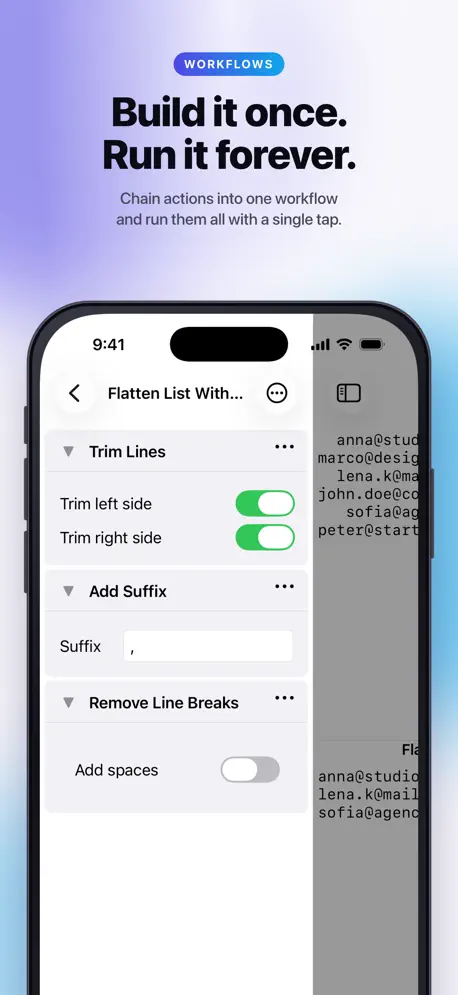
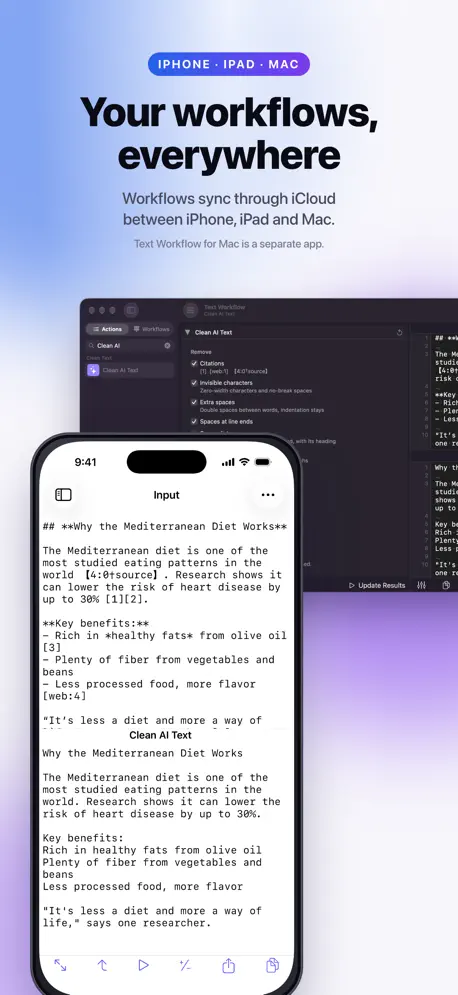
Clean up AI and web text in one tap. Copy an answer from ChatGPT, Claude, Gemini or any website and it comes with junk: [1] citation tags, 【source】 marks, stray ** and ## symbols, curly quotes, invisible characters, broken line breaks. Text Workflow removes all of it and gives you clean text, ready to paste. Exact, every time, and private. It runs on iPhone, iPad and Mac, and your workflows sync over iCloud. NEW IN 3.0 • Clean AI Text: one action removes citations, hidden characters, extra spaces and Markdown symbols. You choose what goes, and code blocks are never touched. • Remove Citations: strips [1], [7][8], [web:1], 【4:0†source】 and Wikipedia notes. • Markdown tables: tables from AI answers now convert to Rich Text and HTML. Format Markdown Table lines up the columns. • Compare Input with Result: see exactly what changed, by character, word or line. • A new text editor with line numbers, visible spaces and tabs, a monospaced font and Find. • Gemini joins OpenAI and Claude, with the newest models. WHY TEXT WORKFLOW • Exact, every time. The same input always gives the same output. No hallucinations, no "regenerate". • Private. Built-in actions run on your device. Never paste sensitive text into a website just to reformat it. • Built for the whole job. Chain 50+ actions into a workflow, save it and run it with one tap. • On every Apple device. A native app on iPhone, iPad and Mac, with workflows synced over iCloud. CLEAN UP AI AND WEB TEXT • Clean AI Text and Remove Citations • Remove Markdown, or turn it into Rich Text for Pages, Word and Mail • Markdown to HTML, with tables • Convert to plain text, strip HTML tags • Straight and curly quotes, accents and diacritics • Delete invisible and non-printable characters BUILD POWERFUL WORKFLOWS Chain actions together and each step feeds the next. Turn the text job you repeat every week into a single tap. • Reorder steps, switch them on and off, nest workflows inside workflows • Regular Expressions: extract, replace with capture groups, or run a workflow only on matching parts • Sync your workflows across all your devices with iCloud 50+ TEXT ACTIONS, INCLUDING • Editing and lines: find and replace (plain or RegEx), prefix and suffix, insert text, sort, number, break and trim lines, remove empty lines, line breaks, duplicates and extra spaces • Case and style: UPPER, lower, Title, camelCase, spell out numbers, format numbers, Style Text, reverse, shuffle, repeat • Data formats: beautify JSON, XML and HTML; JSON and YAML; JSON and CSV; XML to JSON; CSV to Markdown table • Utilities: Base64, URL encoding, encryption with a password, QR codes, UUIDs, text statistics, reading time, dates, math, short URLs WORKS WITH SHORTCUTS Every action and workflow is a Shortcuts action. Clean your clipboard with one tap, or build text automations that run on their own. Use the Share sheet to send text from any app. AI, ON YOUR TERMS AI is one optional step among 50+, not the whole app. Add a prompt step to any workflow with your own OpenAI, Claude or Gemini key, any OpenAI-compatible service such as OpenRouter or LM Studio, or Apple's on-device model. You choose the model and pay the provider directly. Nothing routes through us. TEXT WORKFLOW PRO Free: every action, with results shown in full. Pro lets you copy and share results of any length, create unlimited workflows and compare Input with Result. Payment will be charged to your Apple ID account at confirmation of purchase. The subscription automatically renews unless it is canceled at least 24 hours before the end of the current period. Your account will be charged for renewal within 24 hours prior to the end of the current period. You can manage or cancel your subscription in your App Store account settings after purchase. Privacy Policy: https://www.gtrigonakis.com/privacy Terms of Use (EULA): https://www.apple.com/legal/internet-services/itunes/dev/stdeula/
Release Notes
App Details
| Size | 35.9 MB |
|---|---|
| Initial release | |
| Price | |
| Platforms | iPhone and iPad |
| Languages | English, French, German, Greek, Chinese, and Spanish |
| Category | Utilities |
| Website | gtrigonakis.com/textworkflow-ios |
| Compatibility | |
|---|---|
| iPhone | Requires iOS 15.0 or later. |
| iPad | Requires iPadOS 15.0 or later. |
| Apple Vision | Requires visionOS 1.0 or later. |
More By This Developer
Similar Apps
App's data is regularly updated.
Last update: