
Screenshots


Description
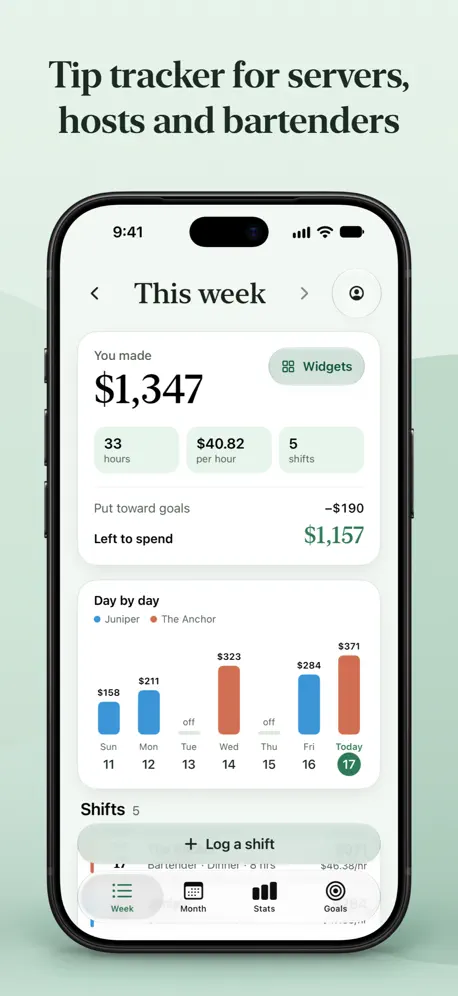
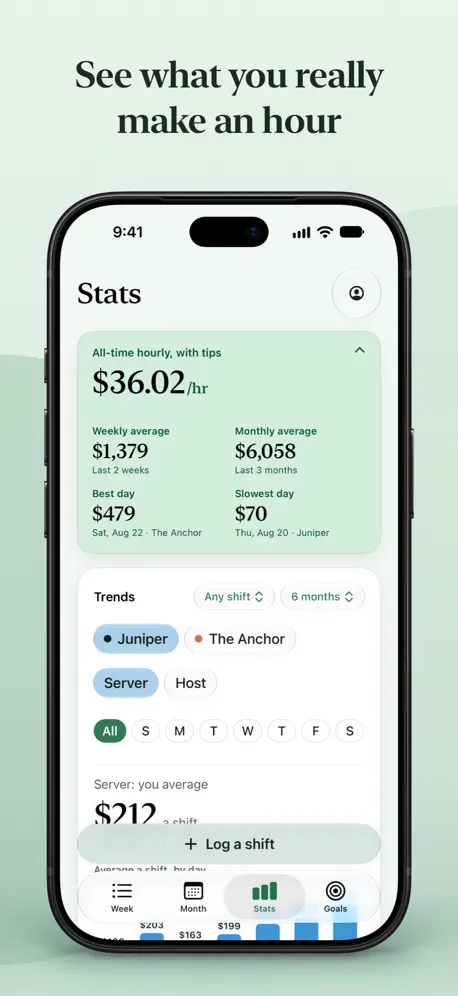
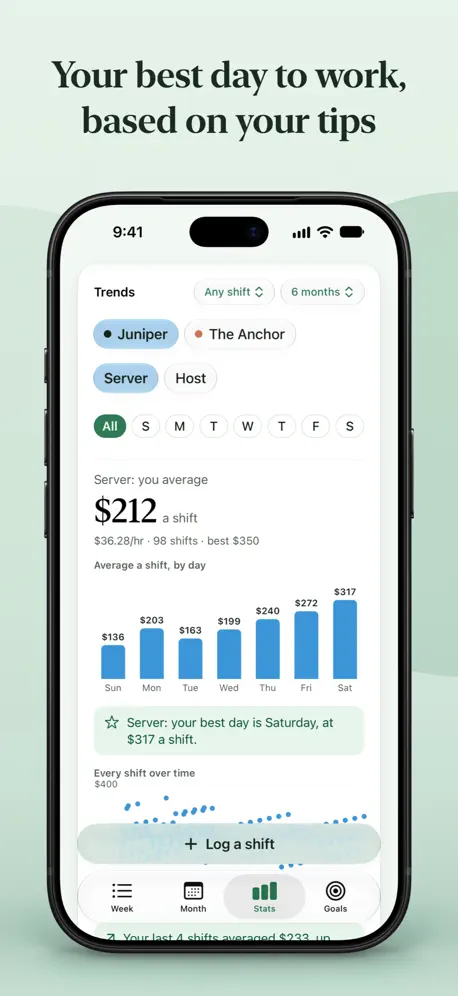
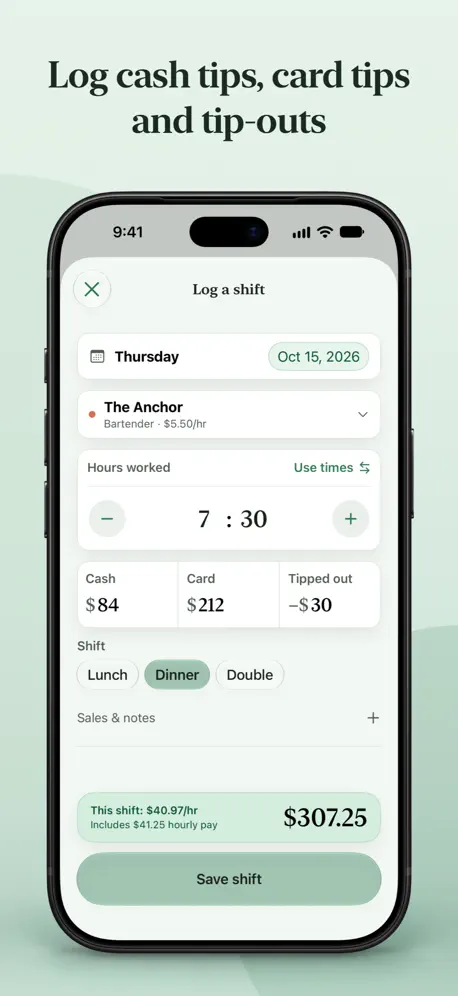
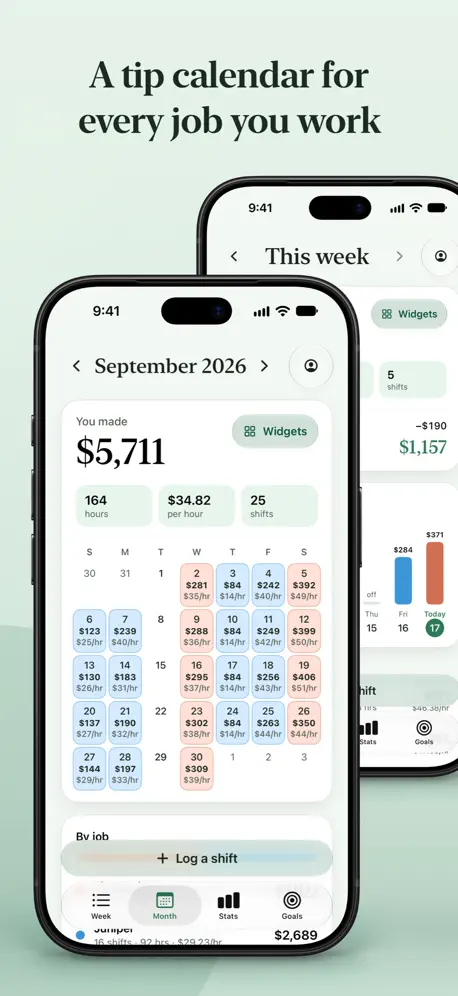
Keeping track of your tips shouldn’t be another shift. Tip’d is a free tip tracker for servers, bartenders, hosts and food runners. Keep your tips, hours, paychecks and goals together across every restaurant job you work, on iPhone, iPad and Apple Watch. No ads. No account. • Add cash tips, card tips, tip-out and hours in a few taps. • Log tips or start a shift timer from your Apple Watch. • Choose the job, position and shift you worked. • Tip’d adds your hourly wages and subtracts tip-out to calculate your total and hourly pay. ASK SIRI • “Log a shift in Tip’d” — Siri asks for your tips and hours and reads the shift back before it saves. • “How much did I make this week in Tip’d” or “What is my hourly pay in Tip’d” — answered from your shifts. • Use Siri and Shortcuts to check goals, add savings and open the tools you need. TIP’D, ELEGANTLY UNFOLDED Made for iPhone Duo. Open your phone and Tip’d unfolds with it, giving your shifts, earnings and goals room to breathe. • See your calendar and shift details side by side. • Enjoy layouts made for the wider screen, from stats and goals to settings and forms. • Fold it closed and return to the familiar iPhone layout. HOME SCREEN AND LOCK SCREEN WIDGETS Tip’d Widget Pack includes six widgets: • Log a shift opens a new shift with your job selected. • Goal Jar shows your progress toward a goal. • This week shows how your week is adding up. • Month at a glance puts your daily earnings on a calendar. • Year at a glance shows your earnings across the year. • Lock Screen rings fill toward your week, month or year target. Each Home Screen widget can have its own theme and light or dark appearance, separate from the app. ALREADY HAVE A SHIFT HISTORY? • Switching tip apps? Export your history; Tip’d reads what it can and asks about the rest. • Import CSV, TSV, text and Excel files, photos, screenshots, PDFs and pasted notes. • Review one summary before saving, and change how Tip’d read it if needed. • Undo an import if you need to. Import files are read on your device, with on-device Apple Intelligence helping when available. You can import without it too. PICK YOUR COLORS • Choose Fern, Ocean, Ember, Burgundy or Graphite. • Use light or dark mode, with matching job and goal colors. • Available in 27 languages. SEE WHICH SHIFTS PAY THE BEST • Check your week and month day by day, with a calendar colored by job. • See your average hourly pay with tips, weekly and monthly averages, and best and slowest days. • Compare positions, shifts and days of the week. Find out how Friday bartending stacks up against Sunday brunch. • Follow your earnings over time with shift charts and weekly totals. KEEP YOUR JOBS STRAIGHT • Give each job its own color and its own positions. • Set the hourly rate for each position. • Filter your numbers by job or look at everything together. SAVE FOR SOMETHING • Create a goal for rent, a trip or whatever you’re putting money aside for. • Add amounts to its jar as you save. Nothing goes in automatically. • See how much you’ve set aside and what’s left from this week’s earnings. KEEP THE PAPERWORK TOGETHER • Record paychecks and attach photos of your pay stubs. • Attach a stub photo or PDF to a new paycheck and Tip’d fills in what it can read, for you to check and save. • Check your paycheck totals for the year. • Export a yearly summary as a PDF or spreadsheet. YOUR DATA • Your records stay on your devices and sync through your private iCloud when enabled. • We don’t collect your shift data, and there are no ads or tracking. I made Tip’d for my wife, who works in restaurants, and for everyone juggling shifts, tips and more than one job. Widget Pack is an optional monthly auto-renewing subscription. Shift logging, stats, trends, goals, paychecks and imports stay free. Terms of Use: https://www.apple.com/legal/internet-services/itunes/dev/stdeula/ Privacy Policy: https://usetipd.com/privacy/
Release Notes
NEW IN 1.4: Tip’d 1.4 comes to iPad and Apple Watch. Log your tips from your wrist and start a shift timer to help log your hours, then spread out your week, calendar, stats and goals on your iPad at home! Also new in this update: • New Apple Watch app. Log your tips in a few taps, or start a shift timer when you clock in. Check your earnings and a goal at a glance, and add Tip’d to your watch face for a quick way in. No iPhone nearby? Your Apple Watch holds your shift until you’re back with your iPhone. • New iPad app. Your shifts, calendar, stats and goals fill the bigger screen, upright or sideways. With iCloud on, your records stay in sync with your iPhone. • New Log a shift button. On iOS 18 and later, add it to Control Center or your Lock Screen. It’s free. • A simpler Log a shift. Enter your hours, or use your clock-in and clock-out times and let Tip’d do the math, even when a shift runs past midnight. • Export the dates you need. Pick one month or your own dates, not just the whole year. • Goal history, month by month. See how much you added to each goal each month. • All-time best and slowest days. Stats now looks through every shift you’ve ever logged. We’ve also fixed bugs, tightened up your totals and improved VoiceOver support. No ads. No account. Yours, Tip’d.
• v1.4All release notes
App Details
| Size | 58 MB |
|---|---|
| Initial release | |
| Price | |
| Platforms | Apple Watch, iPhone, and iPad |
| Languages | Arabic, Armenian, Bengali, English, French, German, Greek, Gujarati, and 18 more |
| Category | Finance |
| Website | usetipd.com |
| Compatibility | |
|---|---|
| iPhone | Requires iOS 17.0 or later. |
| iPad | Requires iPadOS 17.0 or later. |
| Mac | Requires macOS 14.0 or later and a Mac with Apple M1 chip or later. |
| Apple Vision | Requires visionOS 1.0 or later. |
| Apple Watch | Requires watchOS 10.0 or later. |
Similar Apps
WorkHourly: Work Hours Tracker
Shift Schedule & Clock In/Out

Hourly: Shift & Hours Tracker
Time Clock, Work Log & Pay
Time Tracker & Invoicing ∙ Tim
Menubar Timer & Task Manager

Windfall - Expense Tracker
Log spending, bills, budgets

Pockity: Daily Expense Tracker
Budget Planner, Bills & Money

Time Tracker – Punchino
One-Tap Work Time Tracking
App's data is regularly updated.
Last update: