
Screenshots
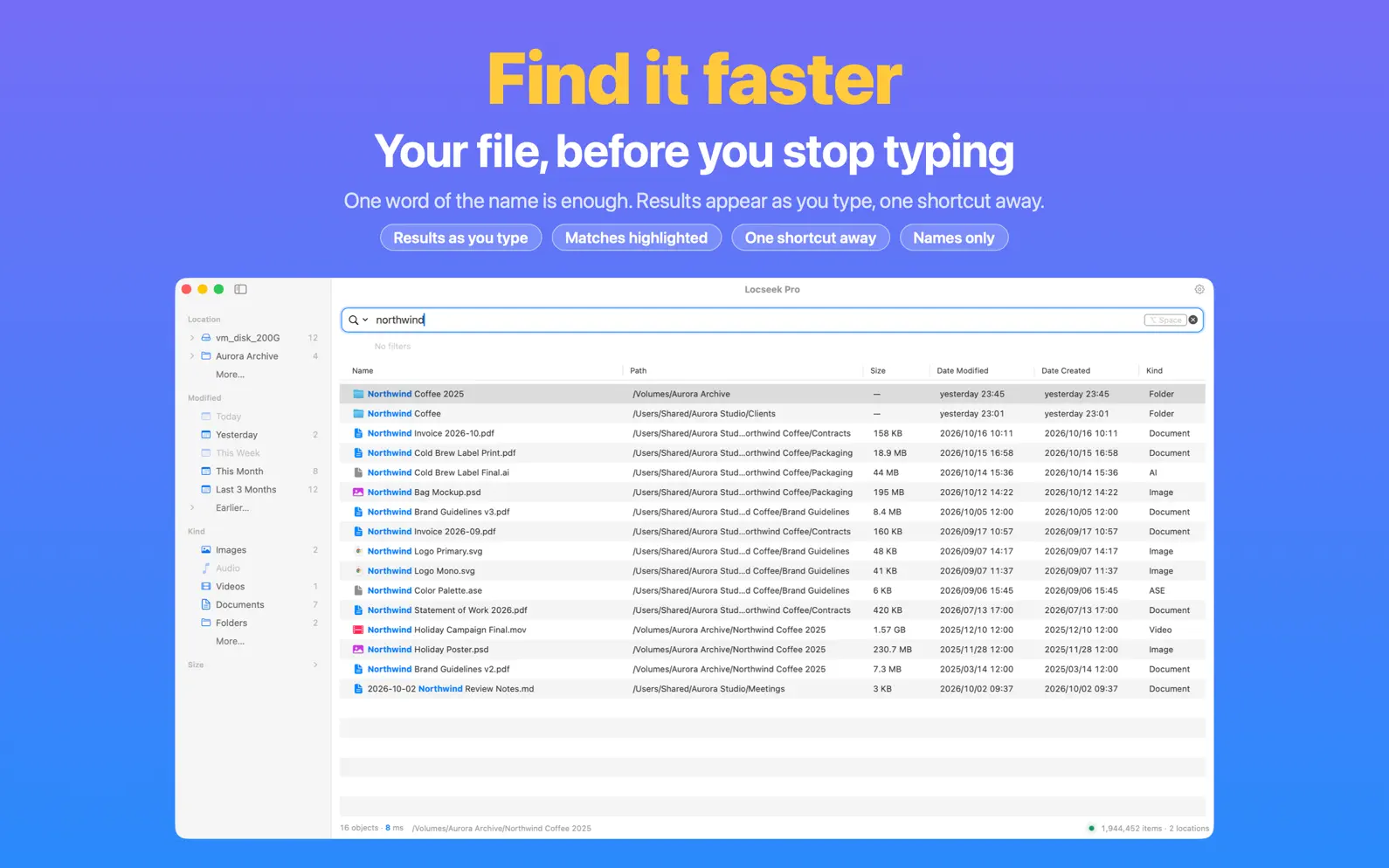


Description
If it's there, you'll find it. Faster. Used to Everything on Windows? It works the same way here: remember one word of the name, and your file shows up before you finish typing. Free to download, no ads. Made for people who know the file name, or just part of it, and want the result now. SUPER FAST One shortcut brings it up, and results appear as you type. Millions of files, no waiting, no digging. SUPER PRECISE Names of files and folders, nothing else. Create, rename, move or delete a file, and the results keep up instantly, so you never get a file that's no longer there. EVERYTHING, EVERYWHERE Your computer, several external drives, USB sticks, your NAS and shared folders. Even when your files are scattered across all of them, one search brings them together, hidden files included. Unplug a drive or lose the NAS connection, and the names you've indexed are still searchable. PEACE OF MIND Locseek only looks at file names. It never opens, reads or uploads what's inside your files. No ads, no sign-up, and Locseek never goes online on its own. Everything stays on your computer, and you can delete it anytime. FOUND IT? FINISH THE JOB No more clicking through folders. Preview, rename, move, compress or tag straight from the results, and undo any slip. Nothing gets overwritten, and anything you delete simply goes to the Trash. TOO MANY RESULTS? ONE CLICK The sidebar sorts them by place, type and date. One click, and only the ones you need are left. All you remember is a big video from this year? Filter by type, size and date. EVERYTHING SYNTAX WORKS HERE ext:pdf, size:>100mb and the like: if you've used Everything, you already know how. WORKS ALONGSIDE SPOTLIGHT If you remember what's inside a file, use Spotlight. If you remember its name, use Locseek. Locseek keeps its own name index and doesn't depend on Spotlight's. QUIET It steps aside when you're done and stays out of your way. A native Mac look, smooth on every Mac, old or new. SEE THE TIME YOU SAVE Locseek estimates how much file-hunting time it saves you, and can turn it into a time-saved card to share with friends. Privacy Policy: https://locseek.com/privacy Terms of Use (Apple Standard EULA): https://www.apple.com/legal/internet-services/itunes/dev/stdeula/
Release Notes
This update gets you there faster, and shows you the time you've saved: • See the time you save: Settings › Achievements shows how much file-hunting time Locseek has saved you, and you can turn it into a time-saved card to share with friends. • More at home on your Mac: a native toolbar and sidebar, with a see-through floating glass sidebar on macOS 26. • Results keep up with fast typing: every keystroke starts a search right away. • Opens faster and uses less memory, no matter how long you've been using it. • Export and import your settings, and take them with you to a new Mac. • More reliable: if your disk gets so busy that the system misses changes, Locseek catches up on the spot, and cloud folders you haven't downloaded no longer show "Index Not Yet Complete". Deleted folders no longer make Locseek rescan from scratch every time it opens. Locseek will keep taking on the impossible and keep evolving, getting better with every update.
• v1.9.29All release notes
App Details
| Size | 5.4 MB |
|---|---|
| Initial release | |
| Price | |
| Platforms | Mac |
| Languages | Arabic, Dutch, English, French, German, Hebrew, Hindi, Indonesian, and 14 more |
| Category | Utilities |
| Website | locseek.com |
| Compatibility | |
|---|---|
| Mac | Requires macOS 12.0 or later. |
Similar Apps




App's data is regularly updated.
Last update: