Screenshots




Description
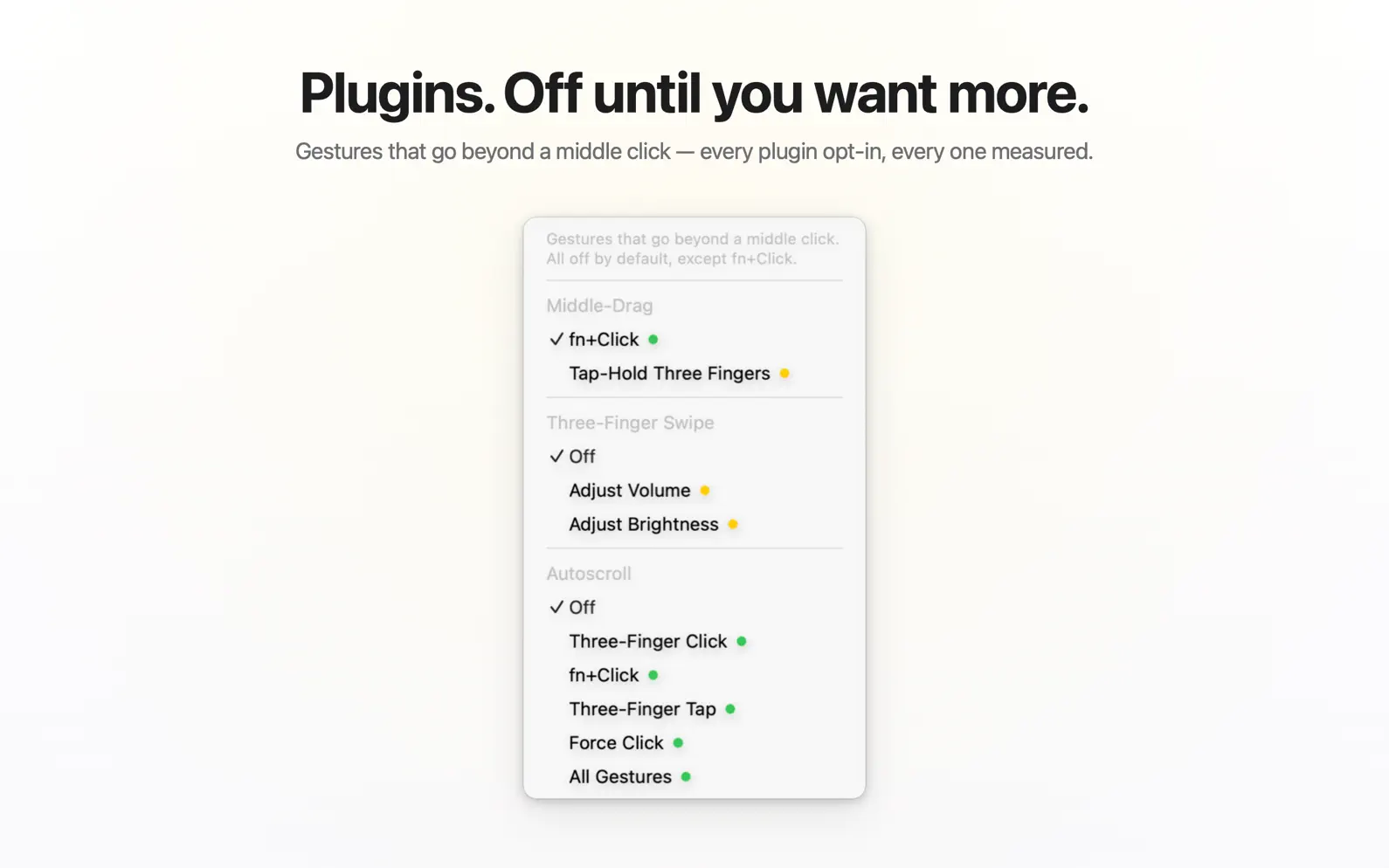
Your Mac has no middle button. WheelClick gives it one. Click the trackpad with three fingers — and links open in new tabs, tabs close in a flick, and every CAD and 3D app pans and orbits the way it was meant to. The button was always missing. Now it's a gesture. FOUR WAYS TO MIDDLE-CLICK • Three-Finger Click — press the trackpad with three fingers. On by default. • Three-Finger Tap — a light tap, no press. Follows your Tap to Click setting. • fn+Click — hold fn and click, with any button on any device. Any modifier key you like, if fn isn't the one. • Force Click — press deeper, past the click. The middle click hiding inside your trackpad. Pick one, or run them all. PLUGINS, WHEN YOU WANT MORE Off until you turn them on: • Middle-Drag — hold three fingers still and slide to pan and orbit in Blender, Fusion, FreeCAD, and OnShape — the same scheme as "Emulate 3 Button Mouse". • Three-Finger Swipe — slide up or down to change the system volume or display brightness. • Autoscroll — drop an anchor and glide the cursor to scroll anything, faster the further you go. Click or Esc to stop. EVERYWHERE, OR EXACTLY WHERE YOU SAY Ignore the frontmost app in one click, or switch to an allow-list so gestures fire only in the apps you choose. THE WHOLE APP IS ONE MENU No windows, no Dock icon, no setup screens. Every gesture is a row in the menu bar — flip it on, flip it off. And every gesture shows its measured energy cost, right beside it. BUILT TO KEEP WORKING macOS quietly disables event taps it distrusts — the reason gesture tools "just stop working." WheelClick catches that and revives itself instantly. It works alongside Three Finger Drag — the trackpad's own pressure readings tell a physical click from the system's synthesized drag — and uses public APIs only: no kernel extensions, no private frameworks, no Input Monitoring — just the one standard Accessibility permission. THE SUCCESSOR TO MIDDLECLICK WheelClick is the official successor to MiddleClick, the free middle-click standard trusted on the Mac for seven years. Not a rename — a ground-up rebuild by the same developer, with everything that feedback asked for. Try everything free for 14 days. After that the middle click stays free forever — three-finger click and three-finger tap, the two gestures MiddleClick existed for — and one purchase unlocks the rest: Force Click, fn+click, middle-drag for CAD, autoscroll and per-app rules. No subscription.
Release Notes
• Three-finger clicks hold up with your fingers in a column. Lying down with the laptop beside you, macOS can count two of the three fingers, and the click came out as a right or left one. The direct download now reads the trackpad itself when that happens. • One tap, one middle click. The right or left click macOS sometimes sends right after a three-finger tap no longer arrives on top of it, so a tap stops opening a context menu or clicking twice. • A trackpad lost after sleep is repaired before the first click, instead of after a gesture fails. In the App Store version, the fallback that carries the trackpad no longer stops at the next wake. • The welcome tour shows each step instead of describing it, and a few middle clicks finish it. • App Store purchases say what went wrong, and Restore Purchases no longer reports "No previous purchase found" for a purchase that is waiting for approval. • WheelClick no longer wakes once a minute when no update is waiting.
• v1.1.11All release notes
App Details
| Size | 4 MB |
|---|---|
| Initial release | |
| Price | |
| Platforms | Mac |
| Languages | English, French, German, Italian, Japanese, Korean, Polish, Portuguese, and 7 more |
| Category | Utilities |
| Website | wheelclick.app |
| Compatibility | |
|---|---|
| Mac | Requires macOS 12.0 or later. |
Similar Apps
Remote Mouse by Duo Trackpad
Trackpad, gestures & shortcuts
AirScroll
Smooth Mouse Scrolling for your Mac
Abnormal Mouse
Swipe, zoom, and rotate with a normal mouse
Double Tap - Remap Shortcuts
Turn shortcuts into double-tap

Switchover
The shortcuts your hands know
PulseTiles
Snap Mac windows with a ⌘-drag or a shortcut
App's data is regularly updated.
Last update: