Event
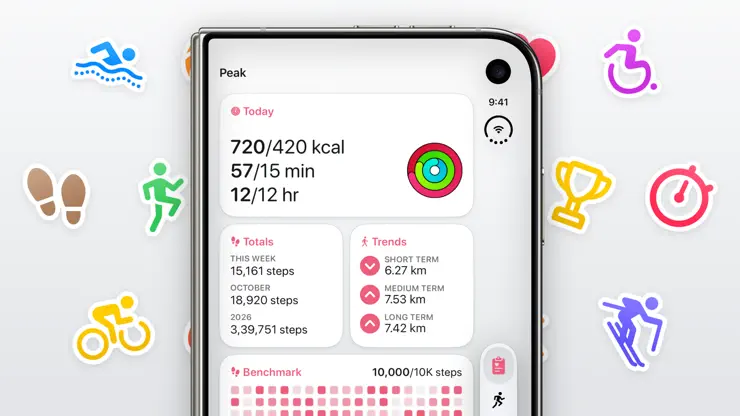
MAJOR UPDATE · Until Nov 22Peak, Made for iPhone DuoPeak has been fully optimised for iPhone Duo. See your stats, workouts, and more, on the inner and outer screens
Screenshots
Description
Peak lets you make your own fitness dashboard, and always stay on top of it with a range of widgets → Your Personal Fitness Dashboard Build a custom dashboard tailored to your needs by picking and choosing the exact metrics you want, such as steps, workouts, activity rings, sleep, and more → Blocks Peak includes a wide range of blocks for all the different metrics, including: - Charts: Simple charts which show your progress over the day, week, month, or year, along with some stats - Benchmarks: Heat map-style charts which show how close you get to a benchmark you’ve set - Totals: Aggregated stats for the week, month, and year, both the ongoing one and previous ones - Comparisons: Side-by-side comparisons of your progress against the previous period, so you always know if you’re beating your past self - Trends: See how your progress this week, month, or quarter compares to the previous 4 of each period - Overview: All your stats for the current week, month, or year, and quickly filter them down to view the stats for a single workout type - Recents: Your stats for the last week - And of course, goals → Goals: Goals are supercharged in Peak. You can make any number of goals you want, and for all the metrics you have. Peak includes two styles of goals: - Show up goals, where you set daily goals and how often you’d like to accomplish them, be it daily, or a certain of days every week or month. These are great for building new habits in a sustainable manner - Build goals, where you set an overall, long term goal for a whole week, month or year. These are recommended for anyone who is looking to maintain their habits. Their less strict definition helps you create more flexible targets → Workout-Specific Stats You can limit blocks to any workout types you want. This means that you can set a goal to go for a swim twice a week, track trends in your runs, see charts of your strength training, and much more! → Widgets & Complications Peak includes a wide variety of beautifully designed widgets and complications to help you keep track of your progress at a glance. These let you keep track of your stats for today, your progress towards your goals, and more. Each widget can also be customized with its own themes, for both light and dark mode → Recaps Get a summary of your progress over the past day, week, month, and year! You can also quickly share your recaps on social media with beautifully designed images → Workout History Browse your complete workout history in one place. Get rich summaries of your training across every week, month, and year, and quickly filter by workout type to find your runs, rides, swims, and more → Workout Details, Route Replays & Splits Dive into any workout for an in-depth look at your effort. Explore your route on an interactive map and relive it with animated replays. Analyze your performance with interactive split charts, whether you want mile, kilometer, 5K, or 10K breakdowns, or halves to see if you ran a negative split → Share Your Workouts Celebrate your effort with beautifully crafted designs. Choose from unique templates featuring your route map, fun stickers, or vibrant gradients, fine-tune the themes and layouts, and share your milestones with friends → An Assortment of Themes Peak includes over 80 beautifully designed themes, so you can find the exact appearance for your tastes. You can even set different custom themes for light and dark mode → Private By Design Privacy is one of the Peak’s core values. Health data is some of the most sensitive data people have, so there is no tracking or data collection → A Delight to Use Peak feels right at home on your iPhone, iPad, Apple Watch, and Apple Vision Pro, and includes familiar patterns and a lot of small touches to make using the app a breeze. You can customize the whole app to fit your style including the app icon, themes, units, and more Terms of Use: https://www.apple.com/legal/internet-services/itunes/dev/stdeula/
Release Notes
Welcome to Peak 5.5, with route replays, goal notifications, and now ready for iPhone Duo! DESIGNED FOR iPHONE DUO Every screen in Peak has been optimized for both screens of the iPhone Duo! On the inner display, the dashboard shows up to 4 columns, and the workouts tab can show your list of workouts and workout details at the same time ROUTE REPLAYS Workouts with routes now show a larger map preview at the top. Tap the map or pull down to make it fullscreen, where you can now replay your workouts from start to finish, seeing your location, distance, and pace over time GOAL NOTIFICATIONS You can now get system notifications for updates on your goal progress. You’ll get notifications when you complete a goal, on critical days where a weekly or monthly goal is at risk, and periodic checkins for longer term goals as well Also new in this update: → Added landscape support on iPhone → The app’s health database now takes significantly less space on disk → Improved various segmented pickers across the app to have better Liquid Glass effect → Updated Feedback form. You can now attach the app’s health database, screenshots, and screen recordings to your feedback emails → When logging your weight or creating a goal or benchmark, you can now use a new slider to quickly change values → Sharing workout maps now shows more information on the map and a bit more colour from your selected theme → The transparent template for sharing workouts is a bit more legible now → Fixed a bug where workouts reported incorrect total energy values. This requires a one-time rescan of your workouts, during which time the app may show no workout data. It should only take about 10 seconds for the full rescan === Peak is made by a team of one. If you have any suggestions or run into any issues, please send me an email at support@sneakpeak.app - Harshil
• v5.5All release notes
App Details
| Size | 345.1 MB |
|---|---|
| Initial release | |
| Price | |
| Platforms | Apple Watch, iPhone, Apple Vision, and iPad |
| Languages | English, German, Italian, and Spanish |
| Category | Health & Fitness |
| Website | sneakpeak.app |
| Compatibility | |
|---|---|
| iPhone | Requires iOS 26.0 or later. |
| iPad | Requires iPadOS 26.0 or later. |
| Apple Vision | Requires visionOS 2.0 or later. |
| Apple Watch | Requires watchOS 26.0 or later. |
More By This Developer

Similar Apps
Peaks: Sleep & Energy
Work With Your Body Clock
Steps: Workout & Pedometer
Activity Tracker & Weight Loss
BuiltDaily: Workout & Water
Private gym & sports tracker
Daily Health: Glance Vitals
Steps, Sleep & HRV Widgets
Fitstatics - Fitness Monitor
Workout-Analysis on your Watch
LifePace Habit Streaks Tracker
Build Routines That Last
App's data is regularly updated.
Last update: