Screenshots
Description
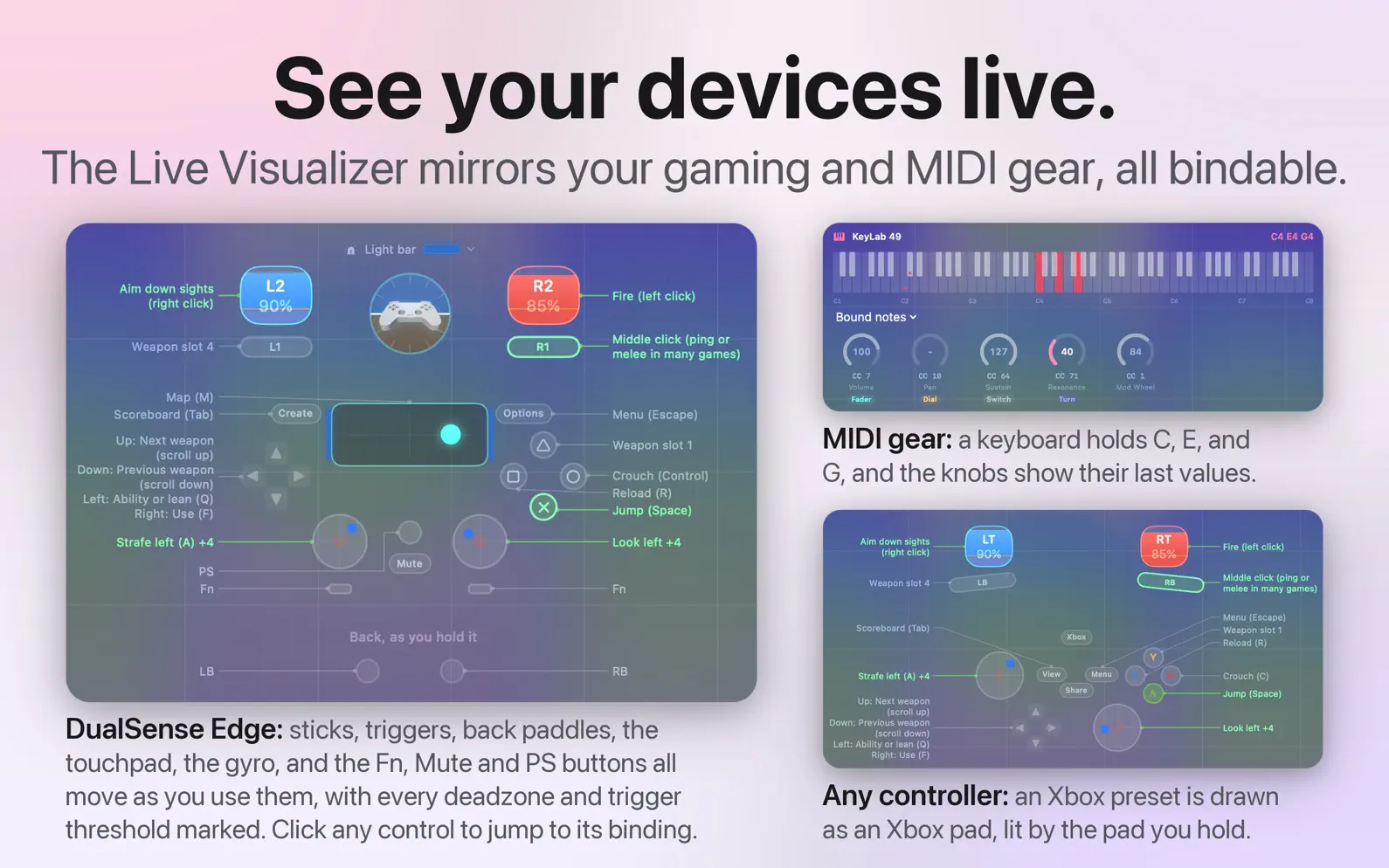
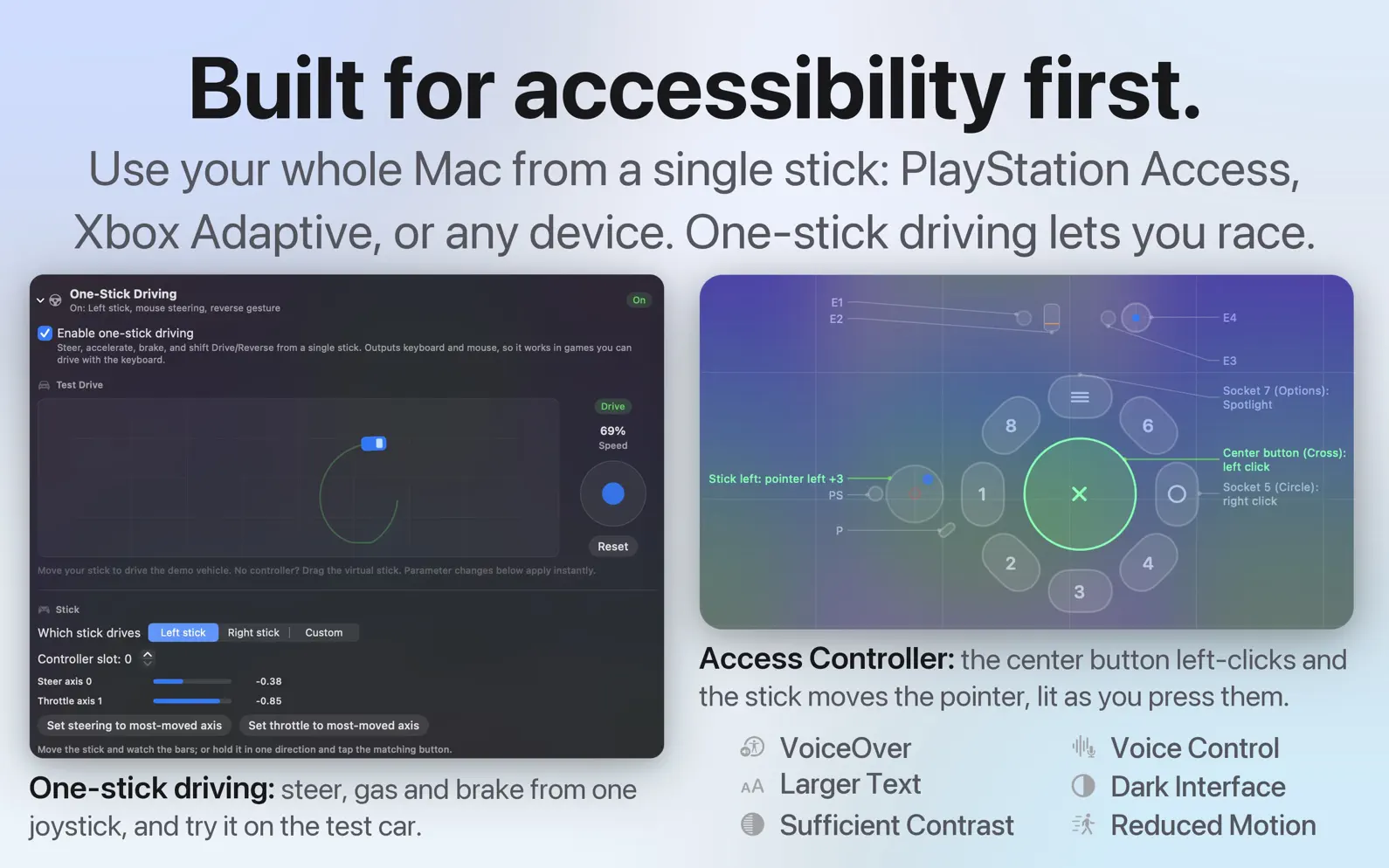
InputConfig is a controller, MIDI, and key mapper for Mac, created for accessibility. Any input in becomes any output out: it turns any gamepad into a keyboard and mouse for every app, and a MIDI keyboard, mouse, trackpad, or a tap on your MacBook into keys, MIDI, shortcuts, system functions, and accessibility actions. Customize any button, trigger, stick, key, pad, and knob, then run macOS and every app with any of the gadgets you love. It is built for accessibility first. If a controller or a MIDI pad is easier to hold and press than a keyboard and mouse, InputConfig makes it a complete, comfortable way to run your computer. The same mappings work just as well for gaming, music, media, and creative work. Every mapping works at the system level, in every app, with nothing extra to install. Inputs - Controllers: DualSense Edge, DualSense, DualShock 4, Xbox, Switch Pro, Joy-Cons, Stadia, 8BitDo, Steam Controller, and any MFi or HID gamepad - PlayStation Access Controller and Xbox Adaptive Controller, with the switches and pedals plugged into them - Flight sticks, racing wheels, pedals, and button boxes, with every axis, hat, and button - MIDI: notes, pads, knobs, the pitch wheel, the sustain pedal, and aftertouch - Your Mac: every key, including the Globe key, plus clicks, scroll gestures, and Force Touch on the trackpad or mouse - Voice phrase: say the words and any output fires, through the microphone you pick - Screen regions: areas of any display that act as buttons when the pointer enters - Stick zones and gestures: rings of a stick, bands of a trigger, and flicks each become their own button - Stream Deck, experimental: keys, plus the Stream Deck + dials and touch strip Outputs - Keys and shortcuts, mouse buttons, pointer movement, and scrolling - MIDI out: a virtual port for notes, CC, pitch bend, and transport to GarageBand, Logic, Ableton, and any DAW - Accessibility actions: Start Dictation, Speak Selection, Zoom On and Off, Zoom In and Out - System functions: volume, mute, media keys, brightness, Mission Control, Launchpad, Spotlight, lock screen, and the screenshot toolbar - Run any Shortcut by name, open any app, or open any URL from a single press - Typed text, spoken phrases through your Mac or the controller speaker, haptic feedback, and light bar colors - Macros with custom timing, and Turbo rapid fire at any rate - Stacked outputs: one press can fire a key, a click, a MIDI note, and a spoken phrase at once Control how it fires - Scan to bind: press a control and it maps on the spot - Hold and double tap: one button carries three actions, with adjustable timing - Chords: a control does something different depending on what is held with it - Toggle: press once to latch on, press again to release - Sensitivity curves, deadzones you set while watching the stick, and Full push at for short reach - Touchpad as a mouse, with tap zones, on DualSense and DualShock 4 - Gyro aim: tilt the controller to move the pointer, set up in one click - One-stick driving: steer, accelerate, brake, and shift from a single stick - DualSense Edge back paddles, FN buttons, and mute, over USB and Bluetooth - Emergency stop: one shortcut halts everything and releases every held key, button, and note Presets and tools - Ready-made presets for popular games and apps, plus the Smart Preset Maker for more than 450 titles - Live Visualizer: watch your controller, MIDI gear, keyboard, trackpad, and screen light up as you use them, with keys labeled for your own keyboard layout - Per-app auto-switch: presets turn on when their app comes to the front - Per-preset automation: open an app or confine the pointer when a preset starts - In 26 languages, with VoiceOver and Voice Control support, app-wide text size, bold text, and reduced transparency Private by design: everything stays on your Mac. No account, no telemetry, nothing sent over the network. Terms of Use (EULA): https://www.apple.com/legal/internet-services/itunes/dev/stdeula/
Release Notes
App Details
| Size | 35.9 MB |
|---|---|
| Initial release | |
| Price | |
| Platforms | Mac |
| Languages | Arabic, Czech, Danish, Dutch, English, Finnish, French, German, and 19 more |
| Category | Utilities |
| Website | inputconfig.com |
| Compatibility | |
|---|---|
| Mac | Requires macOS 14.0 or later. |
More By This Developer
Similar Apps
App's data is regularly updated.
Last update: