
Screenshots



Description
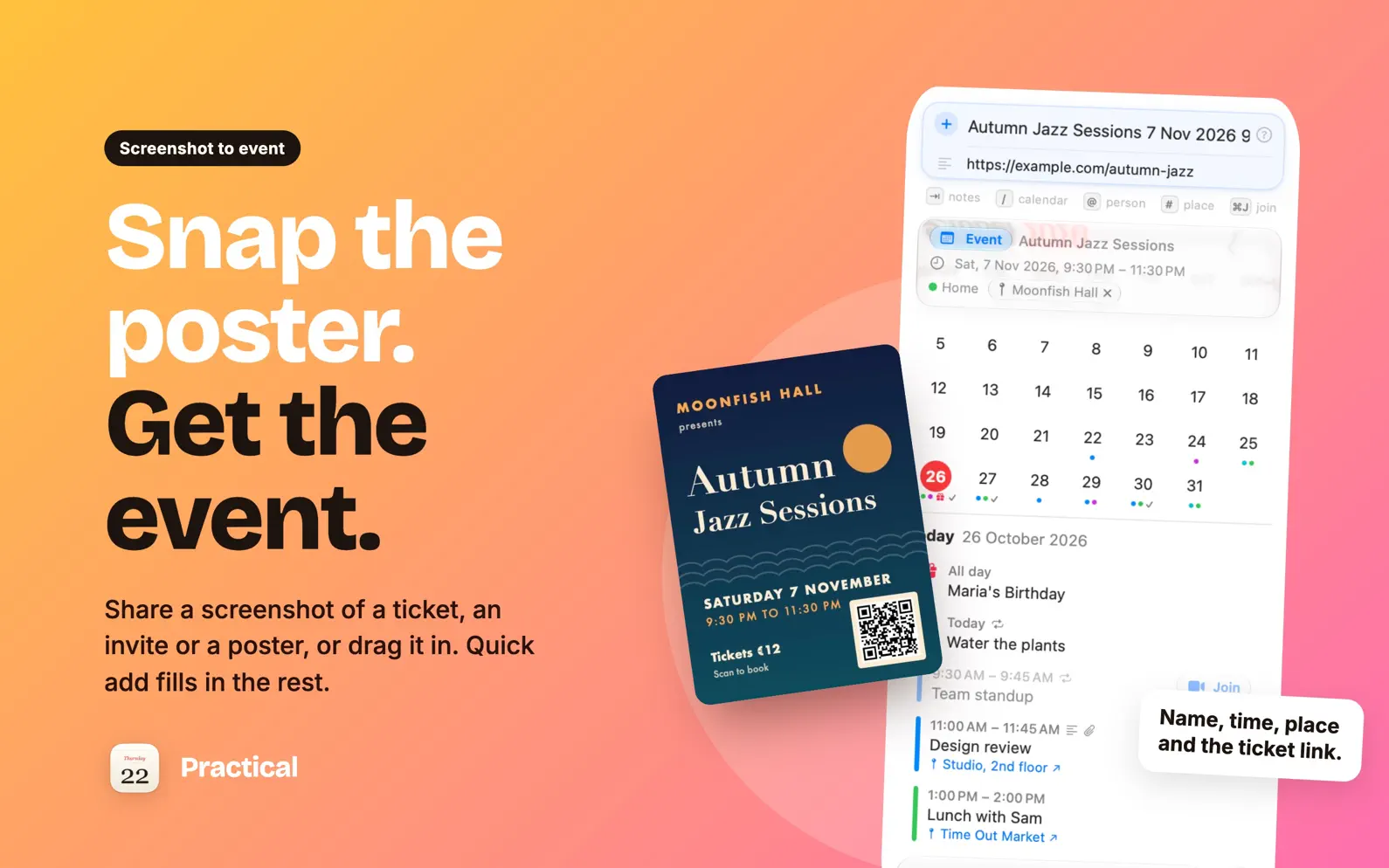
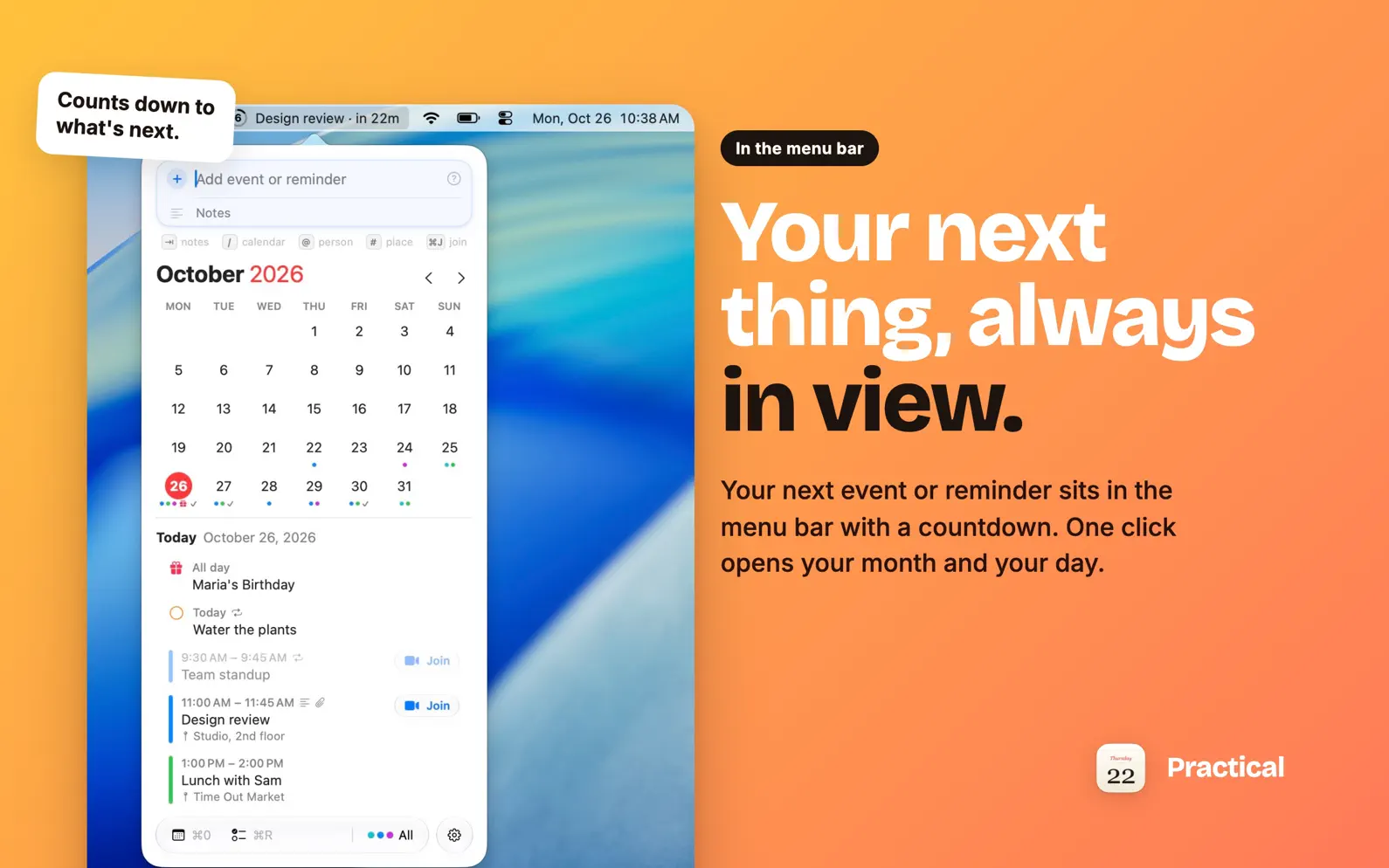
Practical sits on top of the Calendar and Reminders already on your Mac. Your next event or reminder is in the menu bar, the month and your day are one click away, and changes are typed the way you'd say them. CHANGE ANYTHING BY TYPING WHAT'S DIFFERENT Open an event or reminder and type: "push it to Friday" keeps the time, "at 4" keeps the day, "for 2 hours" keeps the start, "every other week" sets the repeat, "move to Home" switches calendars. A card shows each change before you press Return, and Undo is right there. SHARE A SCREENSHOT, GET THE EVENT A ticket, an invite, a poster: share the screenshot to Practical, paste it with ⌘V or drag it in, and quick add fills in the event it shows, with the link from its QR code, ready for Return. It's read on your Mac and never uploaded. ADD BY TYPING A SENTENCE "Lunch with Gaile Friday 1pm for 90 min", "Dentist tomorrow 3pm alert 1 hour before", "todo pay rent every month". Pick a calendar or list with /, link a contact with @, and a place with # so a reminder goes off when you arrive or leave. FILES THAT OPEN ON YOUR IPHONE Attach the boarding pass to the flight or the contract to the meeting. Practical saves it as an iCloud Drive link in the notes, so it opens from Calendar and Reminders on your iPhone and iPad too. THE DAYS THAT SNEAK UP ON YOU A small calendar of its own: when the clocks change, to the minute; Mother's and Father's Day on your country's date; New Year and the solstices. It skips anything your holiday calendar already shows. AND THE REST • Calendar groups (Work, Home) that a Focus can switch for you • Time zones the way Calendar does them • Shortcuts actions and Siri: "What's next in Practical?" • ⌘J joins your next video call; ⌥⌘N opens Practical from anywhere • A missed reminder stays on today, in red, until it's done • Click a birthday to send a happy birthday by Messages or Mail PRIVATE BY DESIGN Everything stays in Apple's own apps, so every account you already use works (iCloud, Google, Exchange). No account, no analytics: your calendars, reminders and contacts never leave your Mac. Free to try for 14 days. Then one purchase unlocks it for good, with free updates. After the trial, the menu bar keeps showing what's next.
Release Notes
- Share a screenshot to Practical (Share › Add to Practical) and the event in it fills in, ready to add. Paste a picture (⌘V) or drop one anywhere on Practical's window too. It's read on your Mac, with Apple Intelligence where your Mac has it. - Posters and flyers read better: the event's own name instead of the venue, and a QR code's link goes into the notes and the event's URL. - Typing a change on a repeating event now asks This Event Only or All Future Events, as Calendar does. The change card says which events it will touch. - Quick add makes all-day events that run several days, like "Web Summit 9 to 12 Nov". - Search finds a month or a year: type December (or Dec 2026) to see what's on then. - Custom alert amounts read a unit letter: type 65m, 2h or 3d. - Typing just a time ("12p") on an overdue reminder moves it to the next time that clock comes round. - While a Focus or calendar group hides some calendars, Practical warns when a new time lands on one of their events, so a hidden appointment never looks like a free slot. - Attached files open with one click on their name; right-click to rename or remove. Attaching the same file again reuses it, and Settings › General › Attachments cleans up leftovers. - Clearer steps for attaching a file, with a short video, and a switch in Settings to show them again. - Checking off a reminder no longer makes it jump: it stays in place, then folds away smoothly. - A short welcome card the first time you open Practical. - Fixes: Return saves right after attaching a file, ⌘, opens Settings again, Settings opens in the middle of the screen, the URL field opens its link, and links only open when they're web, mail, phone or video call links.
• v2026.11.05All release notes
App Details
| Size | 3.7 MB |
|---|---|
| Initial release | |
| Price | |
| Platforms | Mac |
| Category | Productivity |
| Compatibility | |
|---|---|
| Mac | Requires macOS 14.0 or later. |
Similar Apps

Deadline Bar: Due Date Tracker
Menu bar countdowns & focus

ThisDay: Planner & Reminders
Tasks, habits and reminders
Perch: Menu Bar Reminders
Add a task without switching

Solid Calendar
Natural Language Calendar

Pinning – Days Until Countdown
Count down to what matters
Daybearing - Time Blocking
Visual task timer, day planner
App's data is regularly updated.
Last update: