
Event
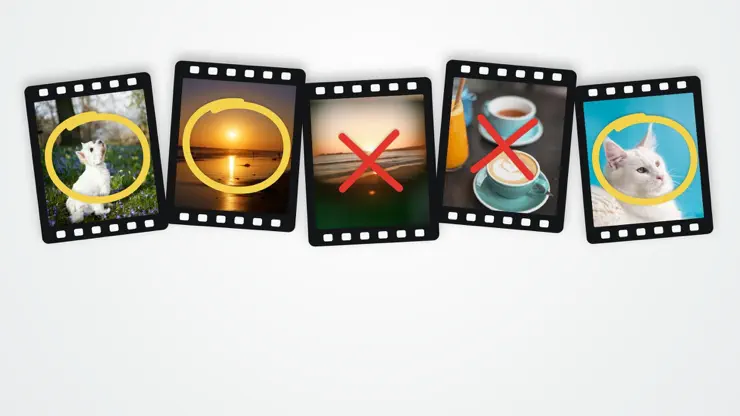
CHALLENGE · Until Nov 23Clear Your Camera RollSift is here. Swipe right to keep, left to bin, and see how much space you free. Nothing goes until you say so.
Screenshots
Description
Your camera roll is full of blurry shots, old screenshots and twelve versions of the same sunset. Sift makes clearing it out quick, and weirdly satisfying. Swipe right to keep. Swipe left to bin. That's it. NOTHING GOES UNTIL YOU SAY SO Binned photos wait in the bin until you're ready. Changed your mind? Undo, or tap anything in the bin to put it back. When you're happy, delete the lot with one confirmation. They'll still sit in Recently Deleted for 30 days, just in case. GO STRAIGHT FOR THE CLUTTER - Screenshots, screen recordings, bursts, long videos, Live Photos, selfies and more - Limit it to a date range, like last summer's trip - Shuffle, or go oldest or newest first - See each item's date, place, type and size before you decide - See how much space the bin will free up YOUR PHOTOS STAY ON YOUR PHONE Sift never uploads your library, and there's no account to make. It works with iCloud Photos too, downloading originals only when you look at them. KEPT MEANS KEPT Anything you keep is skipped next time, so every session picks up where you left off. FREE TO TRY Sift is free for 20 decisions a day. Sift Pro gives you unlimited swipes, plus filters, date ranges and ordering, with a yearly subscription or a one-time purchase. No weekly subscriptions, ever. Sift is made by App Deco Studio, an indie studio in New Brunswick, Canada. Questions or ideas? support.appdeco.ca Terms of Use: https://www.apple.com/legal/internet-services/itunes/dev/stdeula/ Privacy Policy: https://sift.appdeco.ca/privacy-policy
Release Notes
No release notes found
App Details
| Size | 16.2 MB |
|---|---|
| Initial release | |
| Price | |
| Platforms | iPhone |
| Languages | English |
| Category | Photo & Video |
| Website | sift.appdeco.ca |
| Compatibility | |
|---|---|
| iPhone | Requires iOS 26.0 or later. |
More By This Developer



Similar Apps

Unroller: Photo Sorter
Swipe to Delete, Save Storage

ClipCleaner-Clean Up Storage
Swipe & Delete Camera Roll
SnapSweep: Remove Junk Photos
Declutter Photos, Free Space

Undolly Photo Cleaner
Duplicate Photos, Free Space

Gallery Cleaner: Purgo
Cleanup & Organize Photos

Gallery Cleaner : Swipe Delete
Clean My Photos, Minus Storage
App's data is regularly updated.
Last update: