
Screenshots



Description
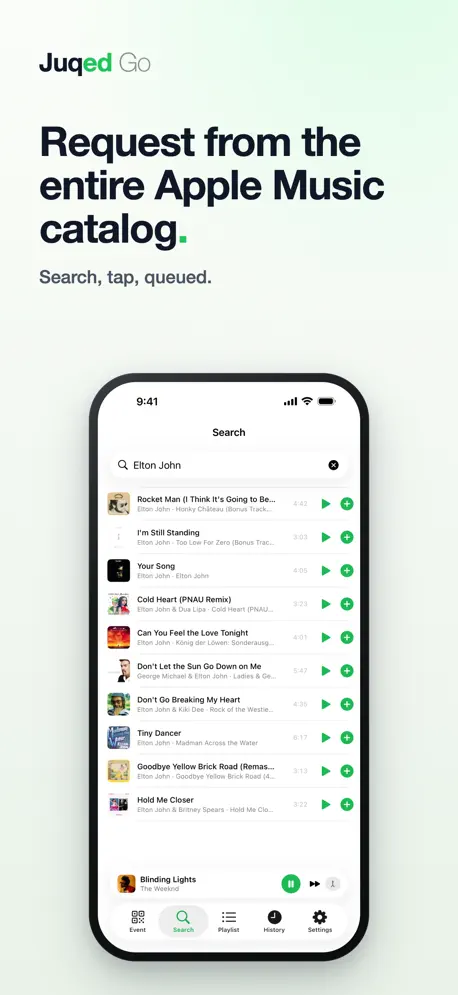
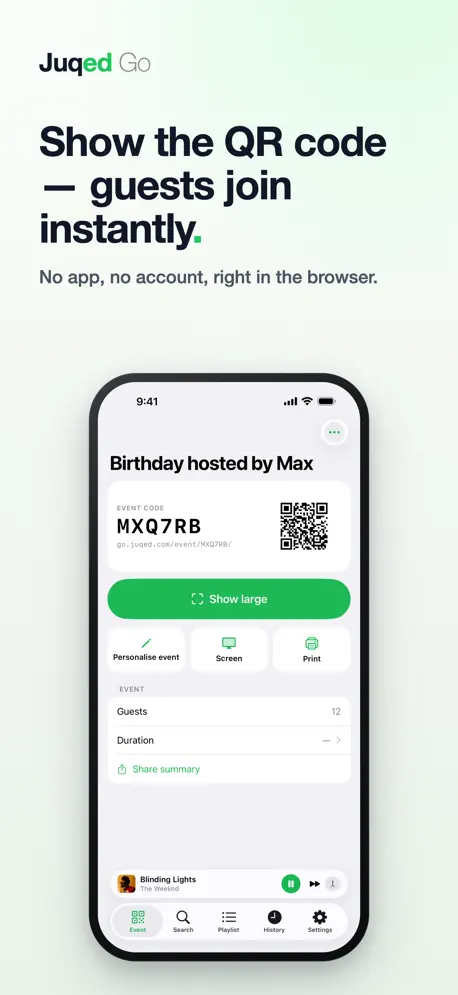
Juqed Go turns your iPhone into the sound system everyone gets a say in. Guests scan a QR code, request songs and vote – no app, no account, no cost. The playlist belongs to everyone. YOUR PHONE STAYS YOURS. The music keeps playing in the background. Lock the iPhone, pocket it, take a call or take photos – playback carries on. Controls sit on the lock screen and the headphone buttons. YOUR GUESTS NEED NOTHING. No download, no account, no cost. The QR code opens a page in the browser, a name is enough. Works on any phone. • Search the entire Apple Music catalog • Add to the queue and vote on everyone else's requests • See live what is coming up next NO SHARED WI-FI REQUIRED. Guests and host do not have to be on the same network. Cellular data and Wi-Fi mixed is no problem – in the backyard, on the bus, in a tent. SHOW IT BIG, PUT IT ON THE WALL. One tap and the QR code fills the whole screen – large enough to hold up across the room. Or send screen mode to a computer hooked up to a TV or projector: the code, the track playing and the requests coming up are then on the wall for everyone. Every guest finds their way in, even with your phone in your pocket. THE MAJORITY DECIDES. Every request goes into the same list and anyone can vote on anyone else's. Whatever sits on top plays next. Requests that wait a long time rise on their own, so the quieter guests get their turn too. YOU KEEP YOUR HAND ON IT. Shared control does not mean losing control: • Play now – pull any request to the front instantly • Blocklist for artists, genres and keywords • Cooldowns and per-guest limits • No voting for your own requests • Block explicit songs – for the whole event or until a set time, say while the kids are still around. The Auto DJ sticks to it too. THE AUTO DJ FILLS THE GAPS. When nobody is requesting, Juqed keeps going – by genre, from your playlists, or matched to what already played. The music never stops. SWITCH DEVICES MID-PARTY. Move a running event from iPhone to iPad or back without ending it. Queue, history and QR code stay the same, and your guests notice nothing. Secured with a one-time code. AFTER THE EVENT. The next day a recap is waiting – every song that played, how it got onto the list, and what made the event what it was. To share with everyone who was there. No names, no accounts. PAY ONCE, HOST AS MUCH AS YOU LIKE. Juqed Go is a one-time purchase. No subscription needed, no per-event fee, no ads. Optionally there is Juqed Gold: personalize your event with a picture of your own – the couple at a wedding, the birthday girl or boy at a birthday. Plus curated playlists for the Auto DJ and, for continuous use in a bar, café or hotel, events that never expire with permanently valid QR codes. READY IN A MINUTE. The setup assistant takes you to a finished event in five short steps – or tap "Start right away". Enjoying Juqed Go? A quick App Store rating helps us a lot, and helps other hosts decide. REQUIREMENTS. iPhone or iPad, an active Apple Music subscription and an internet connection. Only you need the subscription, your guests do not. JUQED GOLD – SUBSCRIPTION TERMS. Juqed Gold is an auto-renewable subscription with a weekly, monthly or yearly term. Payment is charged to your Apple Account. The subscription renews automatically unless it is canceled at least 24 hours before the end of the current period; you can cancel at any time in your Apple Account settings. Terms of Use (EULA): https://www.apple.com/legal/internet-services/itunes/dev/stdeula/ Privacy Policy: https://juqed.com/en/legal/privacy-juqed-go
Release Notes
NEW • Guests see the request page and the recap in their own language. • Screen mode appears in the app's language. • Songs in the playlist move smoothly again when you drag them.
• v2.5All release notes
App Details
| Size | 6.8 MB |
|---|---|
| Initial release | |
| Price | |
| Platforms | iPhone and iPad |
| Languages | Danish, Dutch, English, French, German, Italian, Japanese, and Spanish |
| Category | Music |
| Website | juqed.com/en |
| Compatibility | |
|---|---|
| iPhone | Requires iOS 18.6 or later. |
| iPad | Requires iPadOS 18.6 or later. |
| Mac | Requires macOS 15.6 or later and a Mac with Apple M1 chip or later. |
More By This Developer
Similar Apps

App's data is regularly updated.
Last update: