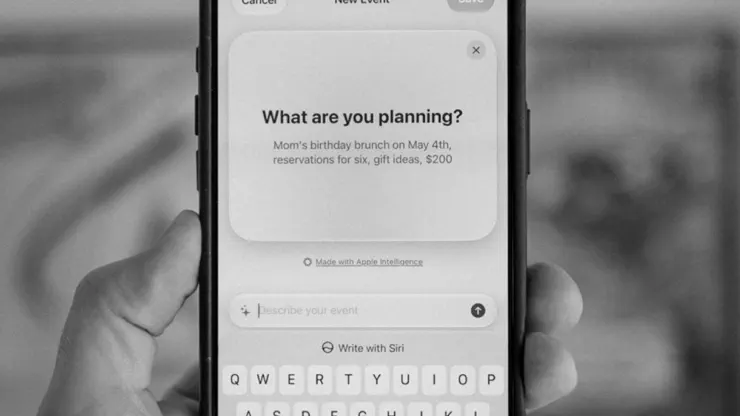
Screenshots
Description
Featured by Apple as “App of the Day” 9to5Mac: “I've found Sofa to be a delight to use.” MacStories: “My favorite app to manage my media watchlist.” iMore: “A great way to organize everything from your games to your books.” ———————— Sofa helps you enjoy your downtime by tracking your shows episode by episode, playing your podcasts, planning your trips, and a bunch of other stuff. All in one app. ORGANIZE WITH LISTS AND GROUPS Add unlimited lists and groups for categorizing all your stuff: books, games, movies, shows, podcasts, and more. A HIGHLY FLEXIBLE PROGRESS TRACKING EXPERIENCE A show you started last month. A book on your nightstand. A game you keep meaning to get back to. Sofa helps you keep track of all of it. Progress rings show up on covers so you can see where you stand at a glance. A FULL-FEATURED PODCAST PLAYER Track podcasts and listen to them in the same app. Save a show, queue up episodes, and hit play without switching apps. A PLANNER FOR TRIPS, TASKS, AND YOUR TV SCHEDULE TOO The hotel confirmation is in your email. The restaurant list is in Notes. The flight info is in a screenshot somewhere. The Planner puts all of that in one event with day-by-day itineraries, budget scenarios, live weather, and file attachments. • Tasks with due dates, priorities, and reminders. • Sticky notes for ideas without a date. • TV episodes and release dates appear on the timeline automatically. RIDICULOUSLY POWERFUL LISTS • Todo Lists or Collection Lists. Hide completed items or keep everything visible. • Group by genre, author, platform, release year, or custom fields. • Data Cards show ratings, runtimes, and metadata right on the item. • Multi-select to move, pin, complete, or remove items in bulk. • Smart Lists with dozens of filters that auto-populate based on your library. • Custom fields called Ingredients for your own ratings, tags, and filters. YOUR DOWNTIME HISTORY The Logbook catches everything you finish. A Stats dashboard shows activity timelines, genre breakdowns, and year-over-year comparisons. PLUS WIDGETS, UNIFIED SEARCH, SHORTCUTS ACTIONS, AND MORE • Widgets with progress rings on your Home and Lock Screen. • Unified Search across your library and new content. • Dozens of Shortcuts actions. • A customizable tab bar that lets you hide what you don't use. ———————— ALL THE WONDERFUL THINGS YOU CAN DO WITH SOFA STANDARD FEATURES (FREE) • Unlimited Groups & Lists • Add Basically Anything (movies, TV, books, games, music, podcasts, apps) • Podcast Player • Planner (events, tasks, notes, upcoming releases) • Logbook • Basic Details (release dates, descriptions, metadata) • Custom Categories • iCloud Syncing SUPER SOFA FEATURES (PAID) • Progress Tracking (TV episodes, book checkpoints, game progress) • Event Planning Tools (weather, budgets, attachments) • Smart Lists (auto-populate based on filters) • Custom Ingredients (custom ratings, dates, tags) • Pinned Items & Lists • List Customization (cover images, large titles, descriptions, layouts) • Enhanced Podcast Player (chapters, per-show settings) • Enhanced Details (streaming/music service links) • Logbook Stats • Reminders (episodes, events, tasks, notes) • Sticky Notes • 100+ Themes & App Icons • Family Sharing (up to 5 people) ———————— Payment will be charged to your Apple ID account at the confirmation of purchase. The subscription automatically renews unless it is canceled at least 24 hours before the end of the current period. Your account will be charged for renewal within 24 hours before the end of the current period. You can manage and cancel your subscriptions by going to your App Store account settings after purchase. Cancellation of the current active subscription period is not allowed. Terms of Use: https://www.sofahq.com/terms Privacy Policy: https://www.sofahq.com/privacy
Release Notes
App Details
| Size | 248.6 MB |
|---|---|
| Initial release | |
| Price | |
| Platforms | Mac, iPhone, Apple Vision, and iPad |
| Languages | English |
| Category | Productivity |
| Website | sofahq.com |
| Compatibility | |
|---|---|
| iPhone | Requires iOS 18.0 or later. |
| iPad | Requires iPadOS 18.0 or later. |
| Mac | Requires macOS 15.0 or later. |
| Apple Vision | Requires visionOS 27.0 or later. |
More By This Developer
App's data is regularly updated.
Last update: