Screenshots


Description
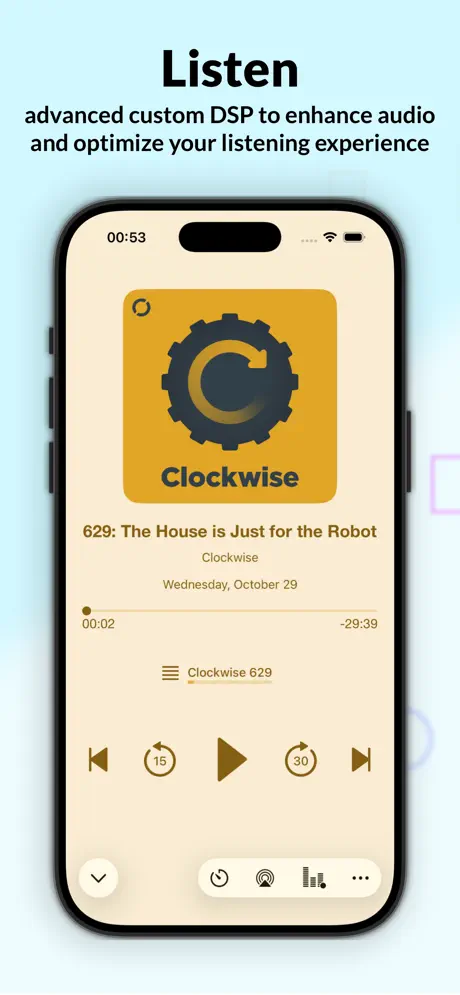
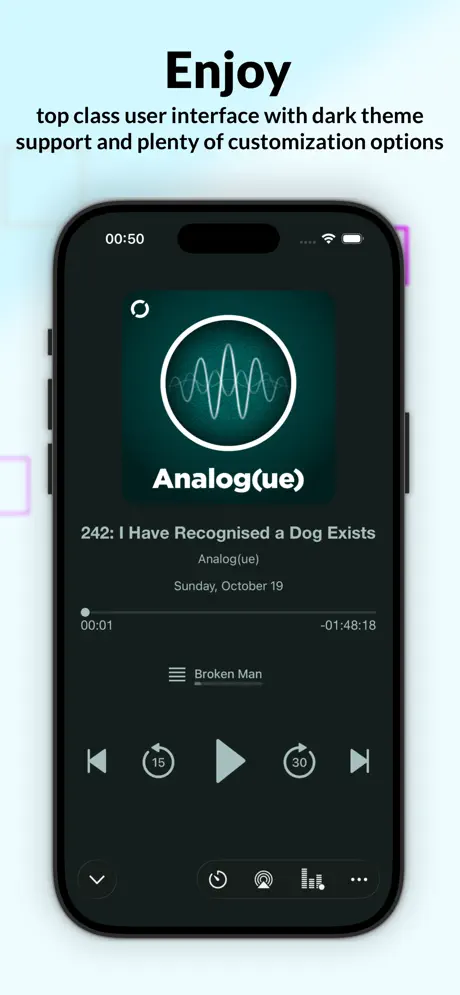
Castamatic is a podcast player for iPhone, iPad, Mac, Apple Watch and CarPlay. Build a custom sequence of episodes or a smart playlist, follow along with on-device transcripts, and hear every show at an even level thanks to the machine learning Auto-leveler. New in Castamatic 14 --------------- -Share as video: share a moment of an episode as a video with the artwork, the waveform and captions. Choose a vertical, square or landscape format. The vertical format goes straight to Instagram Stories. -Chapter selection (Premium): turn off the chapters you don't care about, and playback skips them for you. -Undo (Premium): for 10 seconds, take back a skip, a chapter change or an accidental "Listened". -Chapters from show notes: episodes that list their chapters only in the notes now get real chapters. Highlights --------------- Magic Transcript: generate full episode transcripts directly on your device. Tap any line to jump to that exact moment. Magic Chapters: split episodes into chapters with on-device Apple Intelligence, even when the podcast doesn't include them. Transcript Panel: follow along with a live-scrolling transcript right in the player, with full transport controls. Key Features --------------- -Chapters: quickly jump to favorite topics. Works with published chapter marks, chapters in the show notes and Magic Chapters. -Smart playlists with priority shows. -"On the Go" Playlist: quickly pick shows for the next listening session. -Support your favorite producers with Podcasting 2.0 and Value4Value. -Live podcasts: listen to live shows and get notified the moment they go live. -Podping: receive new episodes immediately after they are published. -Full support for Siri and Shortcuts. -Automatic Leveler: increase audio level consistency between different parts/voices of each show, without altering the original audio character. -Adaptive Gap-Zapper: increase play speed without losing intelligibility by shortening silent parts. -Streaming: save network traffic by downloading only the parts you play. Or download new episodes automatically, and skip the titles you don't want. -Apple Watch: control playback, volume, pick episodes, and adjust audio effects from the watch. -CarPlay: take your favorite shows with you in your car. -iCloud sync: sync subscriptions and playhead position across all your devices. -Backup and restore: manual and automatic backups keep your data safe. -Custom AudioUnit player: maximum performance and minimal battery drain. -Serverless design: Castamatic will keep on working as long as there are podcasts to listen to on planet Earth. Castamatic Premium (in-app purchase) --------------- Castamatic is free to use. An optional yearly subscription, "One Year Premium Subscription", supports indie development and gives you: -No Premium banner -Chapter selection -Undo of your last action -Unlimited imports of external audio files The app shows the price before you buy. The price may vary by country. Payment is charged to your Apple Account at confirmation of purchase. The subscription renews automatically unless auto-renew is turned off at least 24 hours before the end of the current period. Your account is charged for renewal within 24 hours before the end of the current period. You can manage the subscription and turn off auto-renewal in your Account Settings after purchase. Any unused portion of a free trial period, if offered, is forfeited when you purchase a subscription. Privacy Policy: https://castamatic.com/privacy/ Terms of Use: https://castamatic.com/terms_of_use/ -------------- We don't feel comfortable interrupting your listening experience to ask for reviews, but if you are feeling generous please take a minute to leave a nice review. Thank you for your support.
Release Notes
Version 14.0.5 - On iOS 27, Magic Chapters can use Private Cloud Compute: Apple's server model reads the whole transcript and makes the chapters. Turn on "Use Private Cloud Compute" in the Magic Chapters section of Settings. It is off by default. If the request fails, the app tells you why and makes the chapters on your device. - Magic Chapters made on your device are more accurate and faster. - In Search Podcast, each genre now shows the Apple Podcasts chart of your country, with the position of each podcast. Search the list, and sort it by chart position, newest episode or title. - Search results show the date of the newest episode. Podcasts without a new episode for six months show "Inactive". - The welcome screen can now restore a Castamatic backup. - On CarPlay, the podcast list now hides fully listened podcasts when "Hide Fully Listened Podcasts" is on, as the Podcasts tab does. - On CarPlay, the chapter list always opened at the first chapter. It now opens near the chapter that is playing, with an "Earlier Chapters" row for the ones before. - The app sometimes closed when a download resumed in the background. This no longer happens. - OPML import sometimes failed, and some podcast descriptions showed unreadable characters. This no longer happens. Version 14 - Share a moment of an episode as a video: pick the start and the end on the waveform, preview it, and choose a vertical, square or landscape format. The video shows the artwork and the waveform, plus captions when the episode has a transcript. The vertical format goes straight to Instagram Stories. Find it in the player menu for downloaded episodes. - Premium: choose which chapters to hear. Turn off the chapters you don't care about in the chapter list, and playback skips them for you. - Premium: undo your last action. For 10 seconds you can take back a skip, a chapter change or an accidental "Listened". - Chapters for episodes that list them only in the show notes, as lines with a time and a title. - Smarter auto-download: "Skip Titles Containing" in Podcast Settings keeps episodes with the words you choose from downloading. - The player opens and closes as a card that grows from the mini player or from the episode row. Show notes, chapters and transcript open full screen, with the artwork colors of the player. - A podcast's episode list and the search details panel take the color of the artwork. Search genres are now a compact list with tinted icons. - The loaded episode shows its progress as a fill behind the whole row, and rows show the time left or the duration. On CarPlay, rows show the duration, and Now Playing opens at the first playback. - Restoring a backup now asks what to do with your iCloud data: replace it with the backup, or keep it. Your other devices pause and ask before they take the new data. - OPML import no longer freezes the app with large libraries and no longer creates duplicate podcasts. - A backup, an OPML file, an audio file or a feed link opened while the app is closed now actually opens. Before, the app only launched. - Updating many podcasts at once sends at most one notification per podcast, and none for podcasts you don't follow. - A podcast opened from search without subscribing no longer marks its old episodes as played. - iCloud sync resumes where it stopped with very large libraries, and tells you when iCloud stays unavailable for more than a day. - When an action you started fails, the app now tells you instead of doing nothing. - Many bug fixes and performance improvements.
• v14.0.5All release notes
App Details
| Size | 166.7 MB |
|---|---|
| Initial release | |
| Price | |
| Platforms | Apple Watch, iPhone, and iPad |
| Languages | English and Italian |
| Category | News |
| Website | castamatic.com |
| Compatibility | |
|---|---|
| iPhone | Requires iOS 18.6 or later. |
| iPad | Requires iPadOS 18.6 or later. |
| Mac | Requires macOS 15.6 or later and a Mac with Apple M1 chip or later. |
| Apple Vision | Requires visionOS 2.6 or later. |
| Apple Watch | Requires watchOS 10.6 or later. |
Similar Apps




App's data is regularly updated.
Last update: