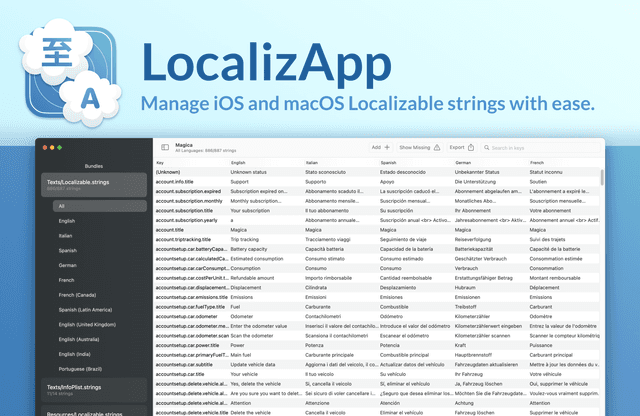
Screenshots
Description
Make app localization effortless with LocalizApp. Harness the power of AI and smart translation tools to transform your development workflow. Key features: AI-Powered Translation with ChatGPT 4, Multiple Translation Services Integration, Strings Management, Missing Translations Detection, Multi-language Support, and complete overview of all your app's localizable content. Monitor and manage all localizable strings in your apps Navigate through .xcstrings, .strings and .stringsdict files effortlessly Copy and paste translations between languages Track missing translations with instant highlighting AI Translation Power - Leverage ChatGPT 4 for context-aware translations - Connect with Google Translate and DeepL services - Translate entire language sets with a single click - Maintain translation quality and consistency Strings Management - View and edit strings in real-time - Works with .xcstrings, .strings and .stringsdict files - Instantly sync changes with your Xcode project Quick actions help you increase productivity - Copy translations between languages instantly - Filter and find strings across all languages - Batch translate missing strings automatically - Export and import translations in various formats Environment Overview - Get a complete view of all your app's translations - Track missing translations across languages - Monitor translation progress in real-time Completely customizable to fit your needs All actions are available through the status bar menu Configure shortcuts to perform actions even quicker Each feature is developed with a focus on productivity to keep you in your flow.
Release Notes
App Details
| Size | 10.1 MB |
|---|---|
| Initial release | |
| Price | |
| Platforms | Mac |
| Languages | Czech, Danish, English, French, German, Greek, Italian, Polish, and 3 more |
| Category | Developer Tools |
| Website | localizapp.dimitrigiani.com |
| Compatibility | |
|---|---|
| Mac | Requires macOS 13.0 or later. |
More By This Developer
App's data is regularly updated.
Last update: